Quick answer
What happened: A WordPress site was suspended by its host after a malware infection planted 3,159 malicious
.htaccessfiles across every folder, plus a self-regenerating beacon file (iqu.txtcontaining only0) in the site root and/wp-admin/.Root cause: Fake plugins and must-use (mu-) plugins acting as a persistence dropper that kept re-creating the malicious files after deletion.
How it was fixed (no SSH required): Our htaccess malware removal process started by stopping the source: we removed the dropper plugins first to stop regeneration, then used the host File Manager to bulk-locate and delete every malicious
.htaccess, ran a full Wordfence scan, and cleaned the remaining 199 flagged files over FTP. The site was restored and the host lifted the suspension.
Case at a glance
| Client | Small business WordPress site (host-suspended for malware) |
| Access available | wp-admin + FTP only — no SSH / WP-CLI |
| Primary symptom | Hosting provider flagged the account as infected; risk of permanent suspension |
| Infection type | Mass .htaccess “lockdown” injection + mu-plugin persistence dropper + scattered PHP backdoors |
| Key indicators (IOCs) | 3,159 malicious .htaccess files; iqu.txt = 0 in root and /wp-admin/; fake plugins; mu-plugins |
| Tools used | Host File Manager (search + bulk delete), Wordfence (full scan), FTP client |
| Files cleaned | 3,159 .htaccess files + 199 Wordfence-flagged items + dropper plugins |
| Outcome | Malware fully removed, regeneration stopped, site live, hosting suspension lifted |
The situation: a host suspension and limited access
The client’s hosting provider had flagged their account as infected with malware and warned that continued infection could lead to a longer suspension. By the time the site reached us, the owner could log into wp-admin and connect over FTP, but had no SSH or WP-CLI access — which rules out the fast command-line cleanup most tutorials assume. Everything in this case study was done with the tools a typical site owner actually has.
This is an increasingly common scenario. According to Patchstack’s 2025 research, 11,334 new WordPress vulnerabilities were disclosed during the year (up roughly 42% year over year), and around 91% of them live in plugins rather than WordPress core. Attackers now exploit many of these within hours of disclosure and, crucially, leave behind persistence mechanisms so a “cleaned” site quietly reinfects itself. That persistence is exactly what made this case interesting.
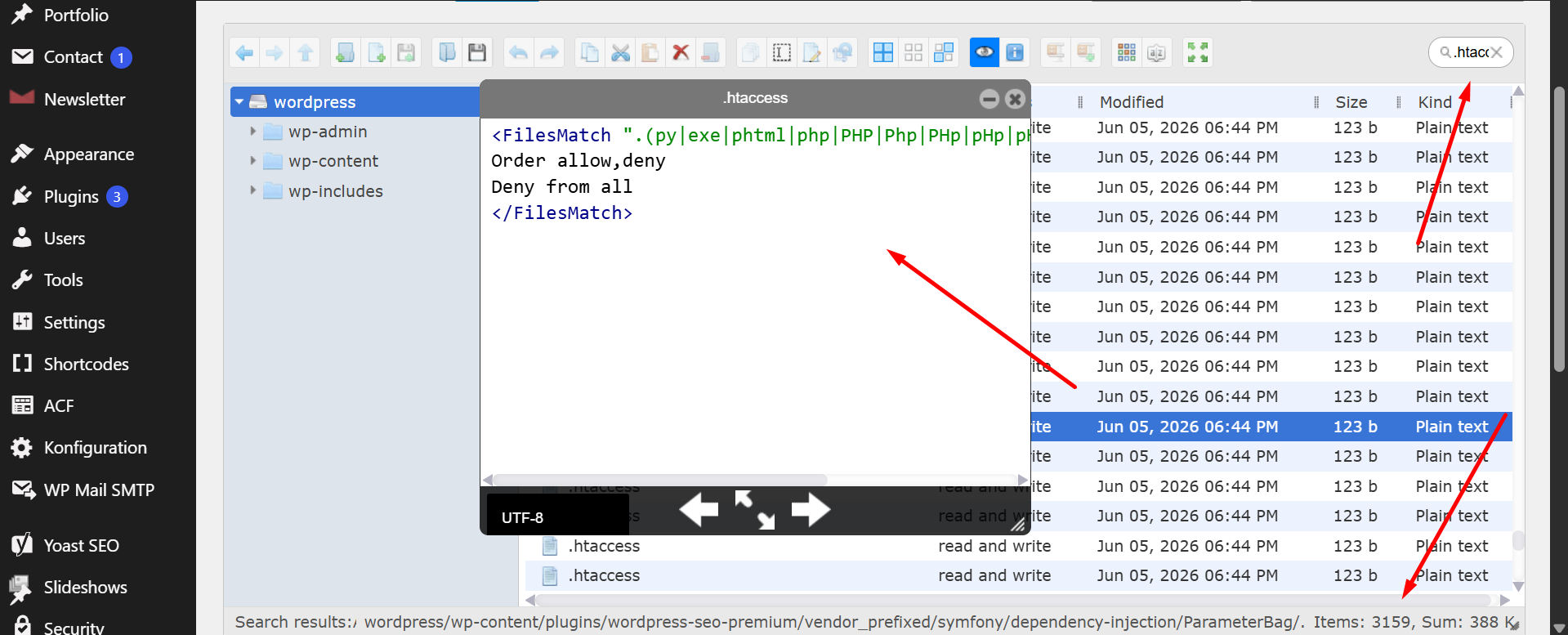
.htaccess files and the malicious FilesMatch payload. (Replace with your screenshot.)Investigation: what we found
1. Thousands of malicious .htaccess files
Searching the file tree for .htaccess returned 3,159 matches — one dropped into nearly every directory on the site, including deep inside plugin vendor folders. Every file contained the same block:
<FilesMatch ".(py|exe|phtml|php|PHP|Php|PHp|pHp|pHP|phP|PhP|php5|suspected)$">
Order allow,deny
Deny from all
</FilesMatch>
At first glance this looks like a security rule — it blocks web access to executable file types. Context is what makes it malware. Deployed site-wide (and especially inside /wp-admin/), a rule that denies all .php requests breaks the dashboard and login page, producing 403 Forbidden errors and locking the owner out of their own site. Security analysts at SiteLock and Jetpack both describe this “deny everything, then allow my own files” pattern as a hallmark of webshell authors who use it to lock a directory and protect their backdoor.
The detail that confirms malicious intent is the suspected extension in the match list. When server-side scanners such as cPanel/Imunify360 quarantine malware, they rename the offending file to *.suspected. By adding that extension to its own deny list, the attacker ensures even already-detected malware stays hidden from view. A legitimate hardening rule would never need to do that.
2. A self-regenerating beacon file: iqu.txt
In the site root we found a 1-byte file named iqu.txt containing only the character 0, with a duplicate at /wp-admin/iqu.txt. Deleting it did nothing — it reappeared on the next page load. Tiny text files like this act as infection markers or counters: the malware uses them to track state, confirm it is still active, or flag a site as “owned.” The fact that it regenerated instantly told us the real problem was a process re-creating it, not the file itself.
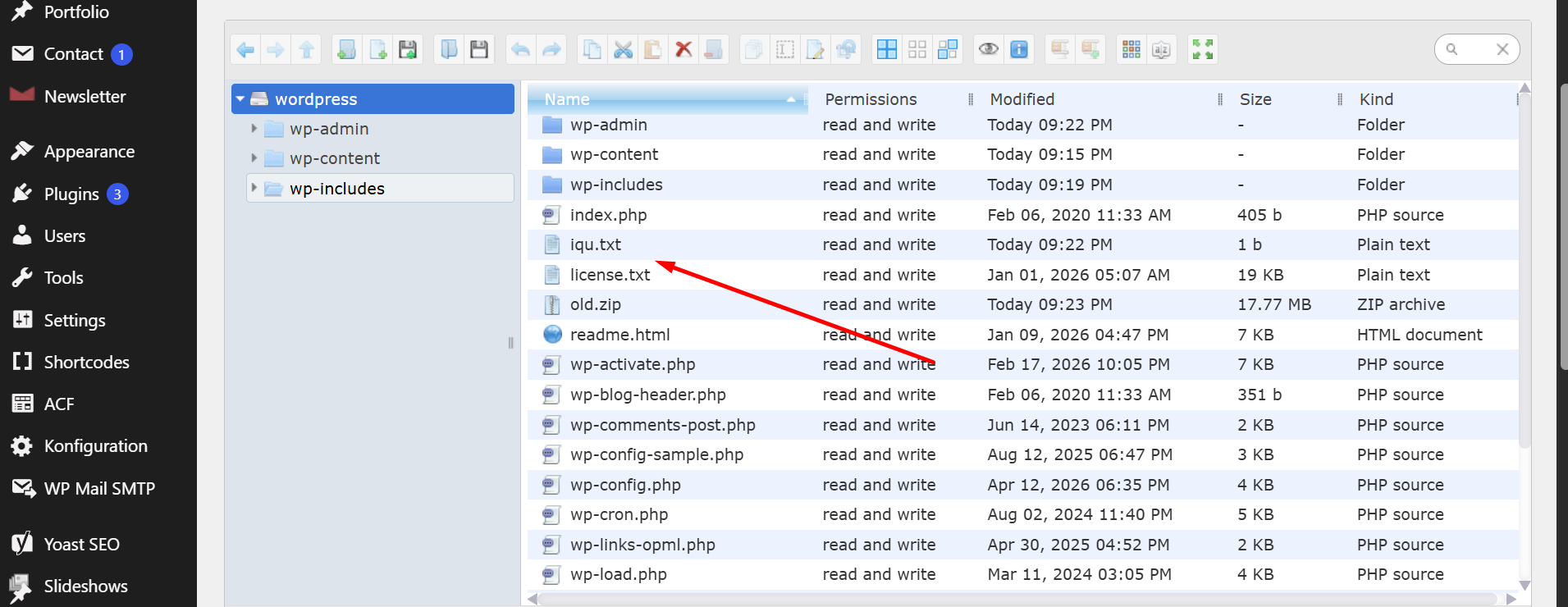
iqu.txt beacon file in the site root next to WordPress core files. (Replace with your screenshot.)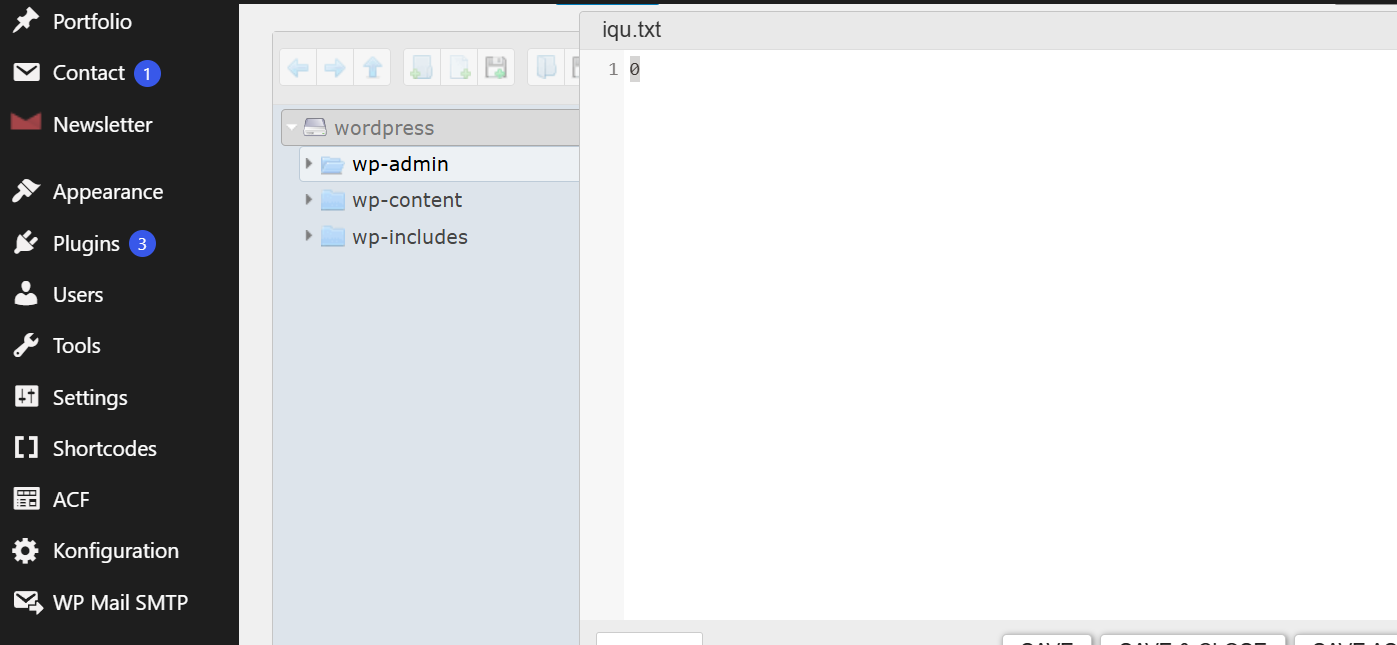
iqu.txt opened, containing only 0. (Replace with your screenshot.)3. The real culprit: fake plugins and mu-plugins
The regeneration pointed straight at the must-use plugins directory (wp-content/mu-plugins/) and a couple of fake plugins disguised among the legitimate ones. Must-use plugins load automatically on every request and cannot be deactivated from the WordPress dashboard, which makes the folder a favorite hiding spot. Sucuri first flagged the surge in mu-plugin abuse in early 2025, and it has been climbing since. Modern droppers are deliberately resilient: they re-add themselves to the active plugins list, restore deleted files from a stored backup, and refresh on a schedule — so removing a single file accomplishes nothing.
That matched exactly what we saw here: as long as the dropper plugins existed, both iqu.txt and the 3,159 .htaccess files kept coming back.
The cleanup: an FTP-only htaccess malware removal workflow that sticks
Because the malware self-heals, order matters. Delete the symptoms first and they regenerate before you finish. Here is the exact sequence we used, all without SSH.
Step 1 — Take a full backup first
Before touching anything, we backed up the entire site (files + database) over FTP. Mass deletion without a backup can break a site or destroy forensic evidence you may need later.
Step 2 — Remove the persistence dropper
We removed the fake plugins from wp-content/plugins/ and cleared the malicious files from wp-content/mu-plugins/. The moment the dropper was gone, iqu.txt stopped regenerating — confirmation that we had cut off the source rather than chasing copies.
Step 3 — Bulk-remove the malicious .htaccess files
With regeneration stopped, the 3,159 malicious .htaccess files were now safe to remove. Using the host File Manager’s search, we located every instance and deleted them. (WordPress only needs one legitimate .htaccess in the site root — none of the per-folder copies belonged there.) We then restored a clean root .htaccess with the standard WordPress rewrite rules so permalinks kept working.
Step 4 — Full Wordfence scan for the leftovers
To catch backdoors the eye misses, we ran a full Wordfence scan. It surfaced 199 results, including additional malicious .htaccess files buried in directories like wp-content/uploads/newsletter/thumbnails/. We reviewed each finding and removed the confirmed-malicious files over FTP.
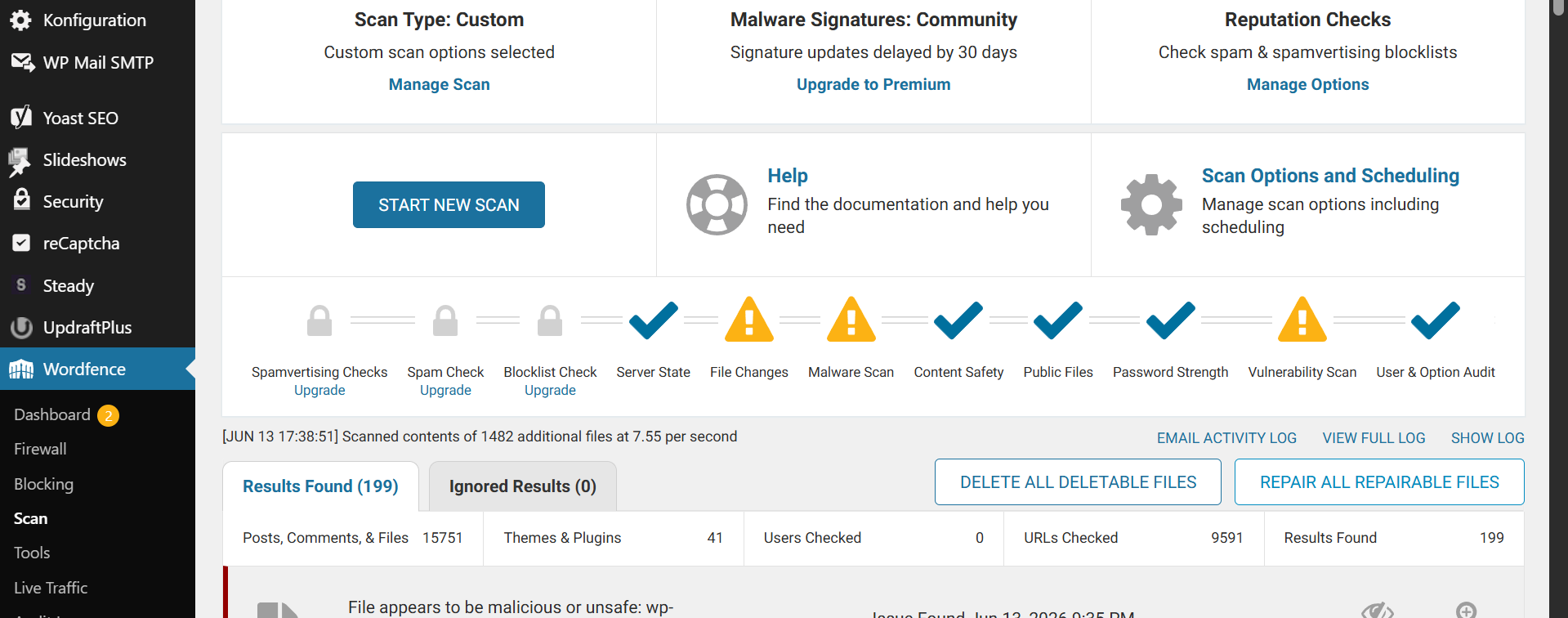
Step 5 — Verify and re-scan
After cleanup we re-scanned, confirmed no files were regenerating, browsed the front end and dashboard for redirects or lockouts, and asked the host to re-check the account. The suspension was lifted.
If you do have SSH
The same job is faster on the command line. With SSH you can list every offending file before deleting, for example by searching for .htaccess files containing the Deny from all signature, then removing them in bulk. The principle is identical: kill the dropper first, then clear the artifacts. FTP simply makes it accessible to owners who don’t have shell access.
Hardening: closing the door so it doesn’t come back
Removal is only half the work. Patchstack’s 2025 data shows that an infected site which isn’t fully remediated is often reinfected within hours, and that a large share of hacked sites contain hidden backdoors. To prevent a repeat we:
- Updated WordPress core, themes, and every plugin, and removed unused plugins (each one is attack surface).
- Changed all admin passwords and the database password, and reviewed the user list for rogue administrator accounts.
- Enabled two-factor authentication on admin logins.
- Added a legitimate, scoped rule that blocks PHP execution only inside
wp-content/uploads/— the opposite of the attacker’s site-wide lockout, because here it stops uploaded scripts from running without breaking the dashboard. - Recommended ongoing file-integrity monitoring so any future change is caught in hour one, not three months later when Google sends a penalty.
Indicators of compromise (IOC) quick reference
| Indicator | Where | Meaning |
.htaccess with FilesMatch ... Deny from all including suspected | Most/every directory | Webshell lockdown + concealment of quarantined files |
iqu.txt containing only 0 | Site root and /wp-admin/ | Self-regenerating infection beacon/marker |
Unknown files in wp-content/mu-plugins/ | Must-use plugins folder | Persistence dropper (auto-loads, can’t be disabled in dashboard) |
| Fake/unrecognized plugins | wp-content/plugins/ | Re-installs malware after deletion |
403 Forbidden on wp-admin/login | Front end | Symptom of the malicious .htaccess lockout |
Frequently asked questions
Is the FilesMatch “Deny from all” .htaccess code always malware?
No — the same code can be legitimate. The Apache FilesMatch directive it relies on is a normal part of server configuration: a developer might add a rule that blocks PHP execution inside the uploads folder (documented by Apache), which is good practice. It becomes malware when it is mass-deployed across the whole site (especially in /wp-admin/), which denies access to the PHP files WordPress needs and locks you out with 403 errors. Including the suspected extension is a strong sign of malicious intent, because that extension only exists to hide files a scanner has already quarantined.
What is the iqu.txt file with “0” in it?
It’s an infection marker dropped by the malware. Tiny single-character text files like this are used to track or flag a compromised site. On their own they’re harmless, but if one keeps reappearing after you delete it, a hidden process — usually in mu-plugins or a fake plugin — is re-creating it. Stop that process and the file stops coming back.
Why do the .htaccess files keep coming back after I delete them?
Because you’re deleting symptoms, not the source. The infection includes a persistence dropper (commonly in wp-content/mu-plugins/ or disguised as a plugin) that regenerates files on every page load or on a schedule. You must remove the dropper first; only then will deleting the malicious .htaccess files actually hold.
Can I remove this malware without SSH access?
Yes. This entire cleanup was done with only wp-admin and FTP, using the host File Manager’s search to find files and Wordfence to locate hidden backdoors. SSH is faster for bulk operations, but it isn’t required.
Will Wordfence detect malicious .htaccess files?
It can, particularly on a full or high-sensitivity scan, which is how we surfaced the remaining 199 items in this case. Combine the scanner with manual file-tree searches, though — automated tools don’t always flag every copy when thousands are scattered across the site.
My hosting account was suspended for malware — what should I do first?
Back up everything, then identify and remove the persistence mechanism before clearing visible malware, patch the vulnerability that let the attacker in, and ask the host to re-scan. Restoring a backup onto a site that still has the original hole will simply get reinfected.
Related services
If you’re dealing with something similar, these specialised cleanups cover the exact issues in this case:
- Hosting Suspension Recovery — get a host-flagged account cleaned and reinstated.
- Hidden Backdoor Removal — find and remove the persistence that causes reinfection.
- Hidden Plugin & Theme Malware Removal — clean fake plugins and mu-plugin droppers.
- Hidden Admin User Removal — remove rogue administrator accounts left behind by an attacker.
- WordPress Security Hardening — close the vulnerability so it doesn’t happen again.
- Malware Monitoring — catch changes in hour one, not three months later.
Locked out, suspended, or stuck in a reinfection loop? We clean the site first and you pay after it’s fixed, with 12 months of support included. Get in touch and send us your symptoms.