A client’s WordPress site was sending visitors to a fake “Are you human?” SMS-verification scam. The theme, plugins and core files were all clean. The infection was buried in the database — inside a malicious WPCode code snippet. Here is exactly how we found it, decoded it, and removed it for good.
Published: June 2026 · Written by the FixHackedWordPress malware response team · Identifiers in this report are defanged for safety.
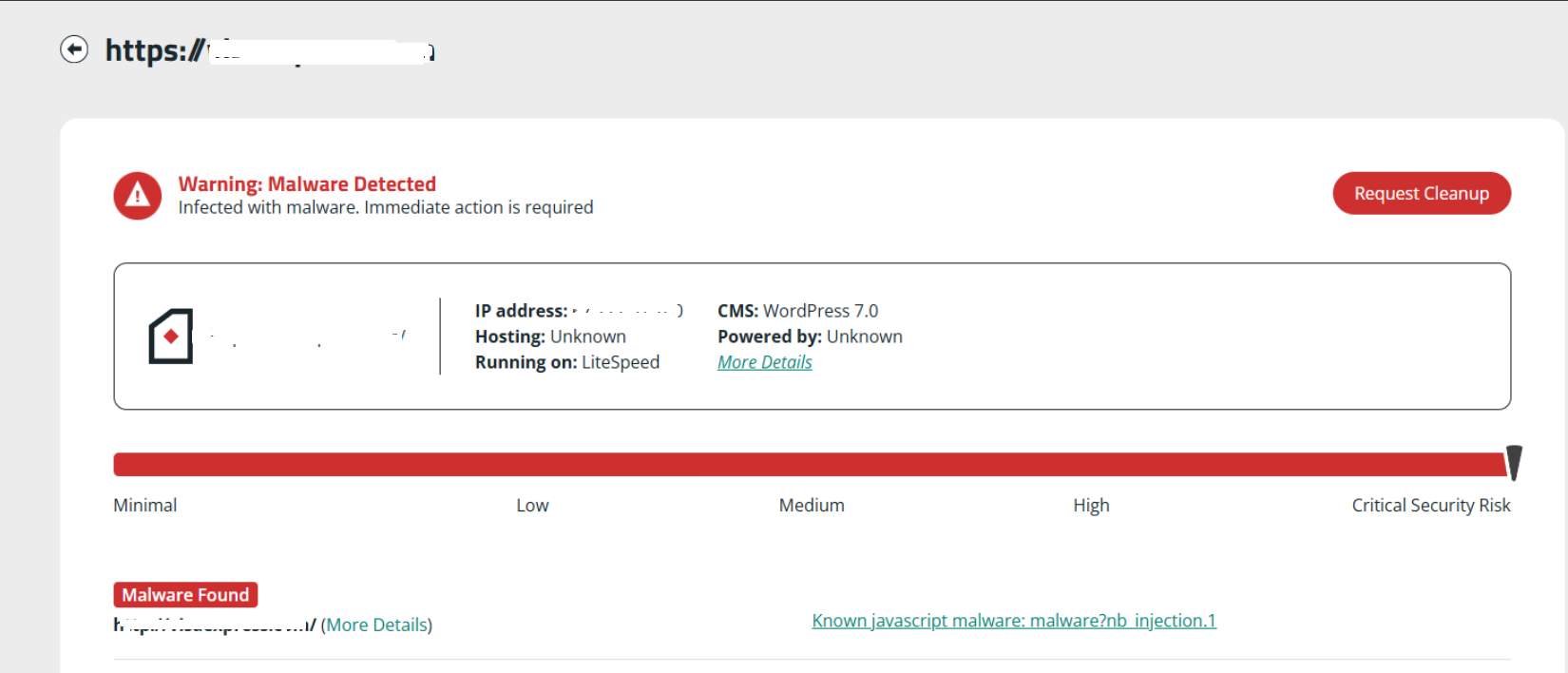
The first red flag: a third-party scan flagged a known JavaScript injection on a WordPress 7.0 / LiteSpeed site — but it couldn’t say where the code lived. That’s the hard part, and the reason DIY scans fail on this family.
Quick Answer
This site was redirecting visitors because malicious JavaScript was stored in a WPCode code snippet, saved inside the wpcode_snippets row of the WordPress options table — not in any file. The script only fired for logged-out visitors, so the owner never saw it. We removed the rogue snippets, cleaned the options and posts tables, deleted the WPCode persistence layer, found the entry point, and hardened the site. Total downtime impact: none — the live site stayed up during cleanup.
Because the payload lived in the database (and was hidden from admins), file scanners and “restore a backup” both miss it. This is the same technique used by large redirect campaigns such as DollyWay and the WPCode injections documented by Sucuri.
0 files
Infected on disk
2 rows
Malicious DB records
Logged-out
Only target was anonymous visitors
WPCode
Abused as the injection vector
The Report
“My site keeps redirecting to a scam page”
The client reached out after customers complained that clicking their site bounced them to an unfamiliar page demanding a “verification SMS.” On the owner’s own browser, while logged in, everything looked perfectly normal — the classic signature of a conditional redirect.
What visitors actually saw
Instead of the real website, anonymous visitors were dropped on a fake “Are you human?” screen asking them to “send a verification SMS” to prove they weren’t a bot. This is a premium-SMS / push-notification scam — it tricks people into subscribing to paid SMS or granting browser-notification permission that then floods them with spam.
Every minute this stayed live, the site was bleeding trust, traffic and SEO equity. Google can flag a site like this as “Deceptive site ahead,” which is why we treated it as an emergency.
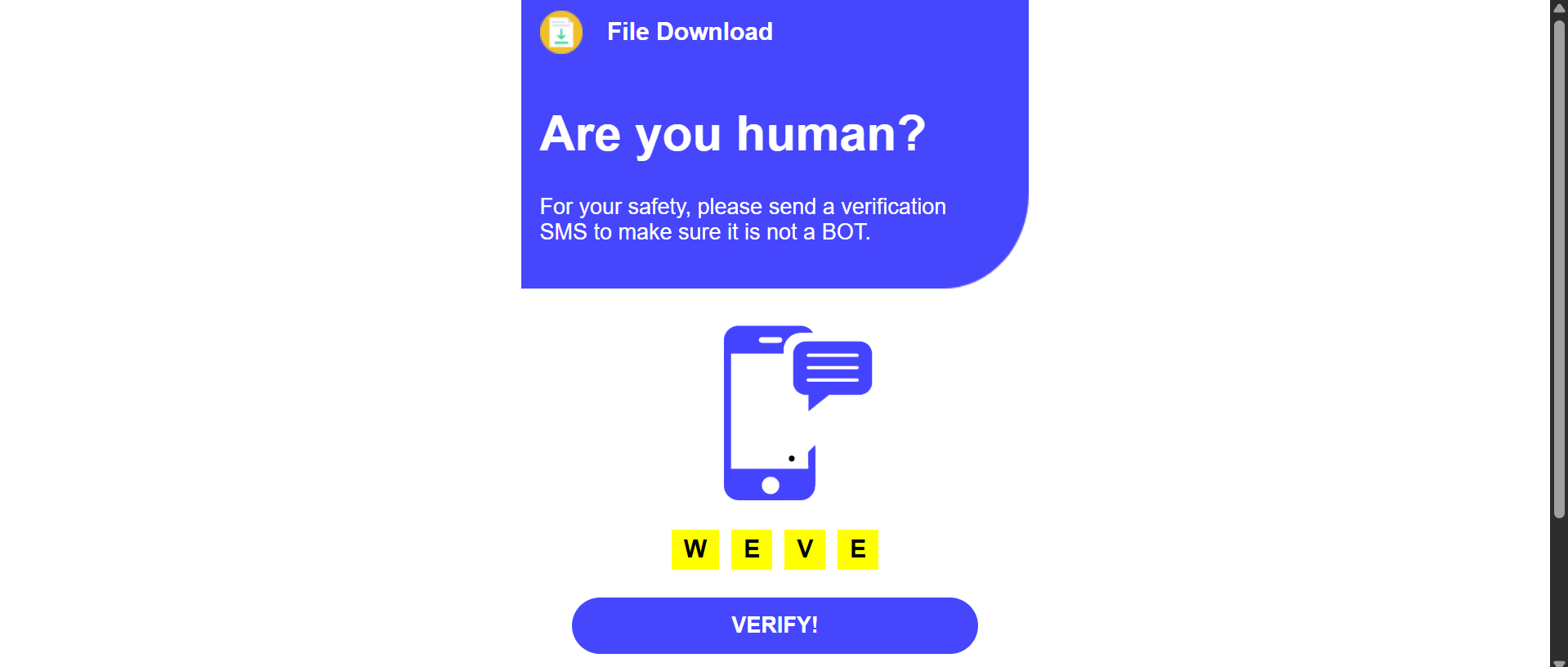
The redirect destination: a counterfeit “human verification” page engineered to harvest SMS subscriptions and notification permissions.
The Hunt
How we tracked it down, step by step
Redirect malware hides where you aren’t looking. We ruled out the obvious locations first, then followed the evidence into the database.
01
Themes & plugins — clean
First stop: wp-content/themes and wp-content/plugins. We checked for hidden or fake plugins, rogue must-use plugins in mu-plugins, and tampered functions.php / header.php files. Nothing. No injected files, no unfamiliar directories. On many redirect hacks this is where the payload lives — not this time.
02
WordPress core — clean
Next we compared the core files against a fresh copy of the same WordPress version and inspected .htaccess, wp-config.php and index.php. All matched the originals. No .htaccess rewrite rules, no injected loaders. At this point the file system was effectively clean — which pointed straight at the database.
03
Database search — two hits
We searched every table for the tell-tale obfuscation marker (the _0x hex-variable pattern these scripts use). The scan returned exactly two matches: one in the options table and one in the posts table. The site used a custom table prefix (NBnhirR_) — good practice, but it didn’t stop the infection.
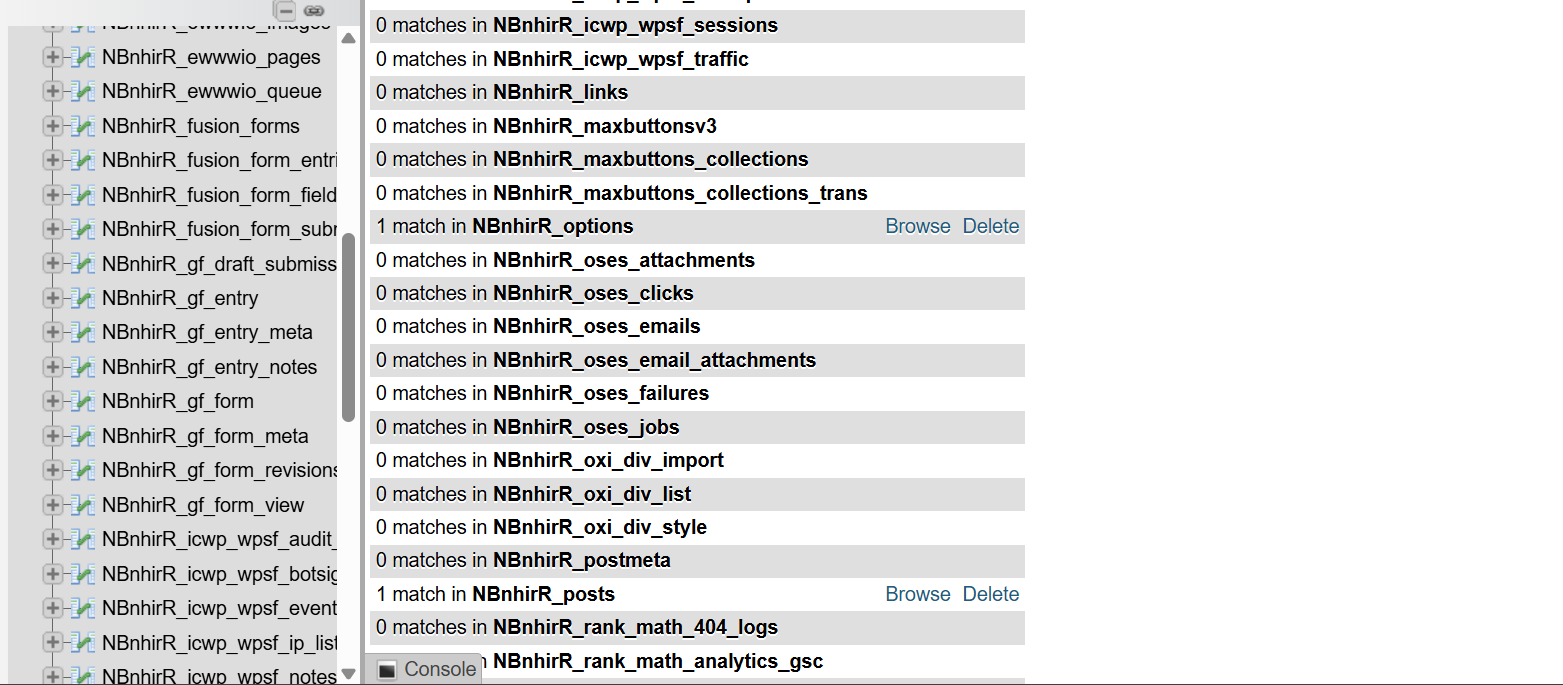
Two rows lit up: NBnhirR_options and NBnhirR_posts. Everything else was clean.
04
The options hit was wpcode_snippets
Opening the options-table match revealed the culprit immediately: the offending row was the wpcode_snippets option, holding a serialized site_wide_header payload. In other words, the malware wasn’t a vulnerability in WPCode — the attacker was using WPCode as a delivery mechanism, storing the redirect script as a “snippet” so it loads on every page without ever touching a file.
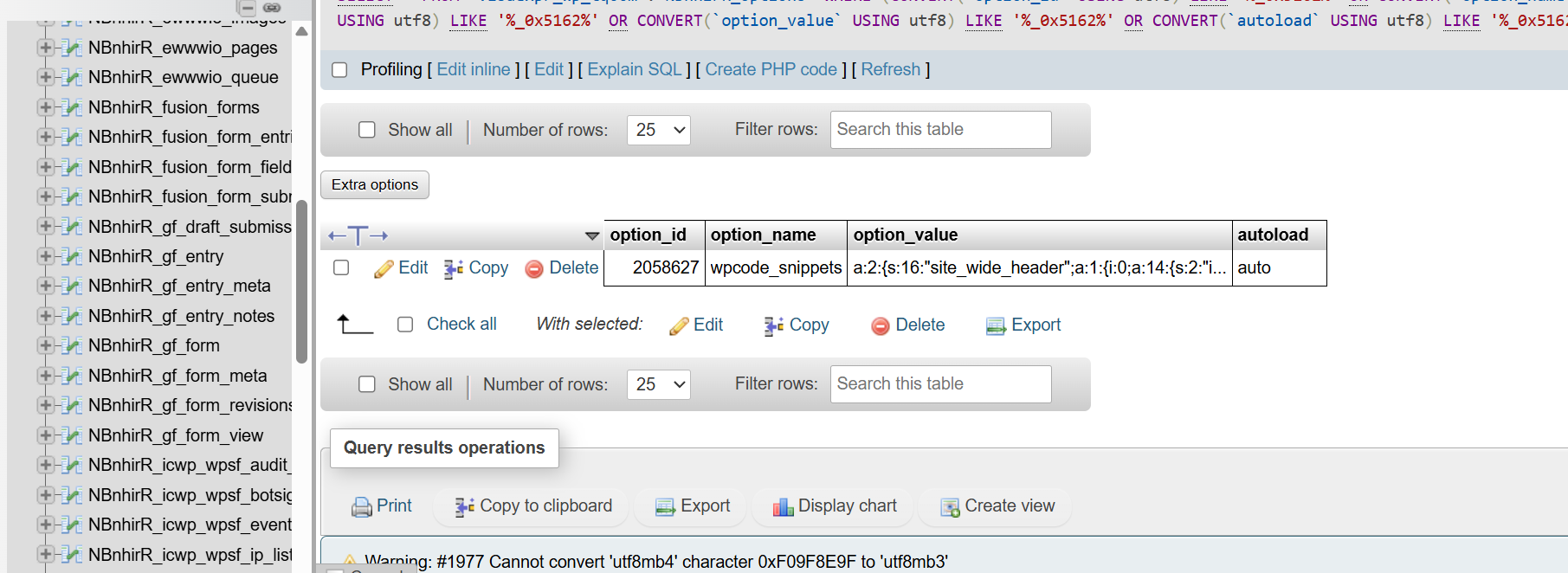
The wpcode_snippets option in NBnhirR_options — a serialized blob hiding a site_wide_header injection.
05
Inside WPCode: two rogue snippets
With the lead confirmed, we opened the WPCode plugin’s snippet manager. Two unfamiliar, active snippets had been planted — both dated the same minute, both attributed to an author named “Tony Chao” that didn’t belong to the site:
- wp_header_javascript — a JavaScript snippet set to “Site Wide Header” (the visible redirect loader)
- Wp_footer_sets — a PHP snippet set to “Run Everywhere” (the server-side persistence component)
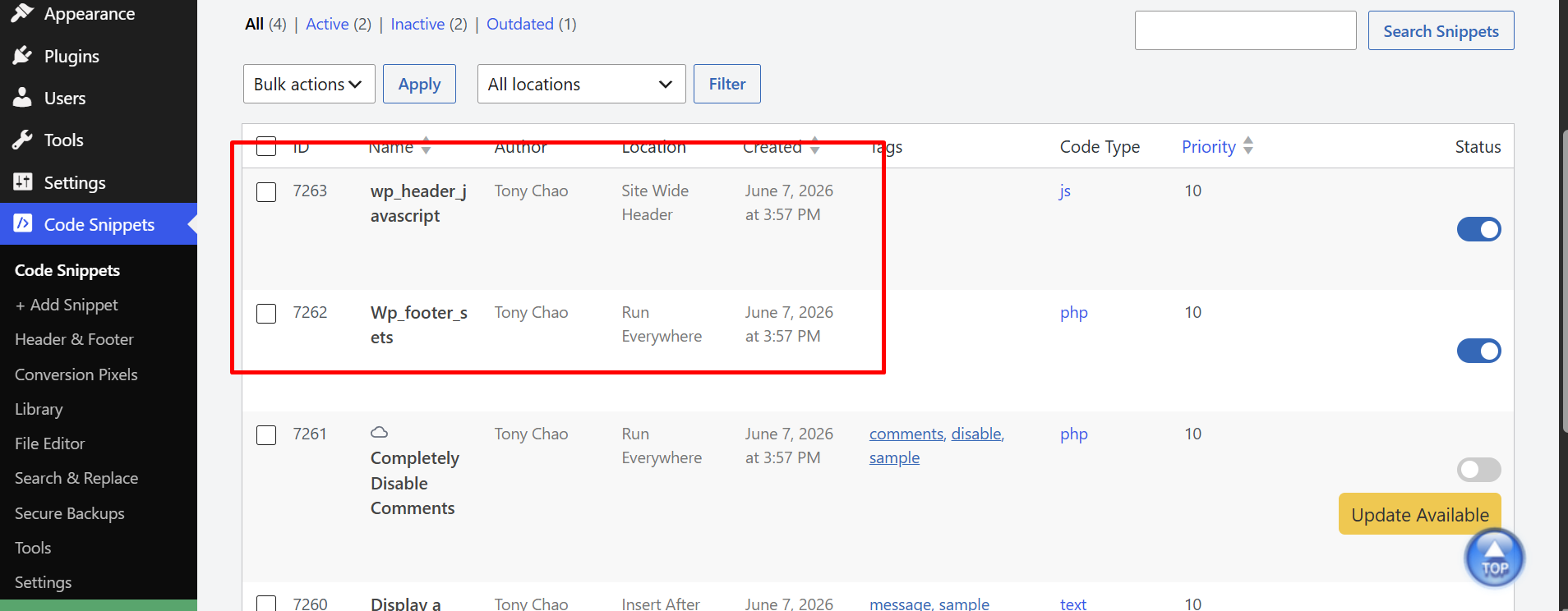
The pairing is deliberate: the JS snippet performs the redirect, the PHP snippet keeps it alive and hides the evidence.
06
The payload, captured
Opening the JavaScript snippet revealed a heavily obfuscated blob — pages of _0x hex variables and an integer-decoding routine designed to defeat signature scanners. This is the exact code we then decoded.
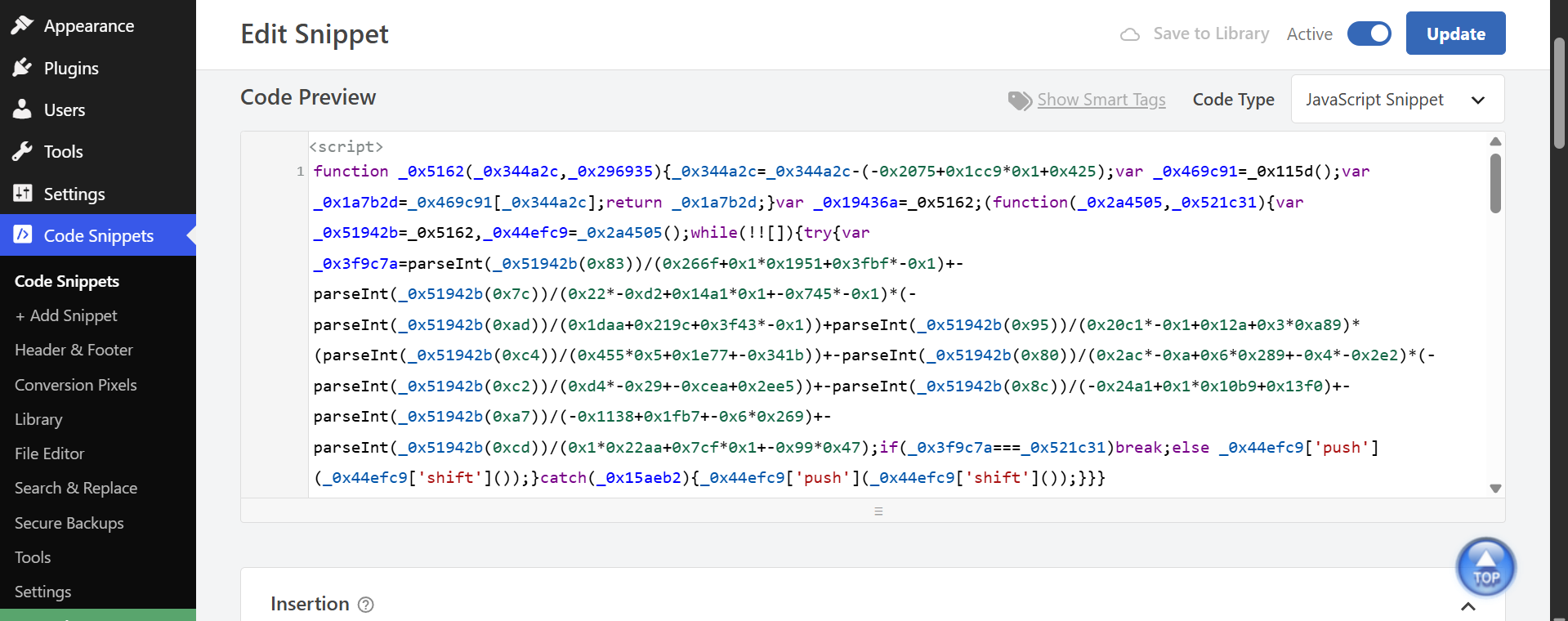
Obfuscation is the whole point — to a scanner it looks like meaningless noise. Decoded, its intent is unmistakable.
Reverse Engineering
What the obfuscated code actually does
The script uses a classic “string-array + rotation” obfuscator: all meaningful text is split into fragments, stored in one array, shuffled at runtime, and pulled back together through a lookup function. Strip that away and the logic is short and ugly.
The same payload as it was served into visitors’ page source, straight from the WPCode header snippet.
Decoded behaviour (plain English)
After de-obfuscation, the snippet does five things in order:
- Phones home. It makes a synchronous request to a first-stage loader URL —
https://get.whitelllshop[.]icu/landers/tzt.php— and reads the response. - Waits for a go-signal. It only proceeds if the response contains a specific marker, then parses that response to learn which destination domain to build.
- Assembles a throw-away domain. It reconstructs the final redirect domain from fragments the server sends back — mixing a prefix (
white/black/blue), a middle word (date/shop/platform) and a TLD (.top/.com/.icu). This rotation is how the campaign burns through hundreds of disposable domains. - Cloaks from admins. Before doing anything, it checks
document.cookieforlogged-in. If you’re a logged-in WordPress user, it does nothing — which is exactly why the owner could never reproduce the redirect. - Injects the redirect. For anonymous visitors only, it creates a
<script>tag (given the idpylon) pointing at the assembled domain with a campaign key, and appends it to the page<head>.
How the obfuscation maps to intent
| Obfuscated technique | What it’s really doing |
|---|---|
| Hex string array + rotating shuffle | Hides URLs and keywords from signature scanners so the code reads as gibberish |
XMLHttpRequest → tzt.php | Fetches live instructions, so the attacker can change the destination without re-hacking the site |
Fragment concatenation (white+…+.icu) | Builds disposable domains on the fly to dodge blocklists |
document.cookie contains logged-in | Skips logged-in admins — the cloaking that delays detection |
Inject <script id="pylon"> into <head> | Delivers the actual redirect to the visitor’s browser |
We’ve deliberately defanged the identifiers above (note the [.]) so this report can’t be used to reach the attacker’s infrastructure.
Why this one was so hard to find
Three design choices made this infection nearly invisible to the owner, to scanners, and to a backup restore.
It lived in the database
No infected files means file-based scanners and “compare to core” checks come back clean. The payload sat in wpcode_snippets as serialized data — the kind of place most scans never read.
It hid from admins
The logged-in cookie check meant the owner saw a perfect site every time, while customers got redirected. The PHP snippet compounded this by concealing WPCode’s own footprint.
A backup wouldn’t fix it
The snippets were created recently, so most recent backups already contained them. Restoring would have re-installed the malware — and left the original entry point wide open.
The Cleanup
How we removed it — and kept it gone
Deleting the snippet alone isn’t enough. The PHP persistence layer can rebuild it, and the original hole stays open. Here’s the full protocol we ran.
Remove both snippets at the source
We deactivated and deleted both rogue snippets, then surgically cleaned the wpcode_snippets value in NBnhirR_options and the injected record in NBnhirR_posts — without disturbing the client’s real content.
Kill the persistence & rogue access
We audited NBnhirR_users for hidden administrators, reviewed every other snippet and mu-plugin, and confirmed nothing was left to silently re-add the payload after removal.
Find and patch the entry point
A snippet doesn’t appear on its own — it requires admin-level access. We traced how that access was obtained, closed it, rotated all credentials and security keys, and hardened logins and file permissions.
Verify like a visitor, then clear flags
We re-tested as an anonymous, mobile, and search-referred visitor to confirm the redirect was truly gone, re-scanned externally, and prepared the site for any Google Safe Browsing review needed to clear warnings.
For Site Owners & Researchers
Indicators of compromise (IOCs)
If you suspect the same infection, search your own site for these. Finding any one of them is a strong sign you have this WPCode redirect malware.
| Type | Indicator (defanged) | Where to look |
|---|---|---|
| Loader URL | get.whitelllshop[.]icu/landers/tzt.php | Outbound request / snippet body |
| Campaign key | key=419c824f8…a7a1f1 | Injected <script src> |
| Injected element id | pylon | Rendered page <head> |
| Database option | wpcode_snippets with unfamiliar site_wide_header | Your _options table |
| Rogue snippets | wp_header_javascript (JS), Wp_footer_sets (PHP) | WPCode → Code Snippets |
| Snippet author | Unknown author such as Tony Chao | WPCode snippet metadata |
| Code pattern | Obfuscation using _0x hex variables | _options / _posts rows, snippet body |
| Scanner detection | nb_injection.1 JavaScript malware | External scan result |
| Behaviour | Redirect to fake “Are you human / verify by SMS” page | Logged-out visitors only |
Found one of these and don’t want to touch the database yourself? Send us your URL for a free infection check.
Is This Your Problem Too?
Match your symptom to the right fix
This case was a database-stored redirect. Related infections look similar but hide elsewhere — if your symptom matches a row below, that page is the right place to start.
| Your symptom | Likely infection | Get the right fix |
|---|---|---|
| Visitors forced to spam / scam pages | Redirect malware | Redirect malware removal |
| Cleaned it, but it keeps coming back | Hidden backdoor / persistence | Hidden backdoor removal |
| Obfuscated JS in your head/footer | Malicious JavaScript injection | Malicious JavaScript removal |
| “Deceptive site ahead” warning | Google blacklist flag | Google blacklist removal |
Frequently asked questions
Is the WPCode plugin itself malware?
No. WPCode (Insert Headers and Footers) is a legitimate, widely used plugin. The problem is that it can store and run arbitrary JavaScript and PHP — so once an attacker has admin access, it’s a convenient place to hide a payload inside the database where file scanners won’t see it. The plugin wasn’t the vulnerability; it was the hiding spot.
Why did the site look fine to the owner but redirect everyone else?
The script checked for a logged-in cookie and skipped anyone who had it. Site owners are almost always logged in, so they see a perfectly normal site while logged-out customers get redirected. This cloaking is the single biggest reason these infections go unnoticed for weeks.
My file scanner says the site is clean. Could I still be infected?
Yes. This payload lived entirely in the database (the wpcode_snippets option and a posts row), with zero infected files. A file-only scan will pass while visitors are still being redirected. Confirming a site is clean requires checking the database and testing as a logged-out visitor.
Can’t I just delete the snippet and be done?
Deleting the visible JavaScript snippet stops today’s redirect, but the paired PHP snippet (and any hidden admin or backdoor) can rebuild it, and the original entry point is still open. Reliable removal means clearing the database records, killing the persistence layer, patching the way in, and rotating credentials.
Where was the redirect actually sending people?
To a fake “Are you human?” verification page that pressured visitors to send a verification SMS or allow browser notifications — a premium-SMS and push-notification scam. The destination domain rotated constantly because the malware rebuilt it from fragments supplied by its command server on each load.
Will my Google rankings recover after removal?
Usually, yes. Once the malicious code is gone and the site is secured, Google can re-crawl your real content, and any “Deceptive site ahead” warning typically clears within about 72 hours of a successful review request. Acting quickly limits the SEO damage.
How fast can you clean an infection like this?
We treat active redirects as emergencies. In this case the diagnosis-to-clean window was a matter of hours, and the live site stayed up throughout. Send us your URL and we’ll start with a free infection check.
Seeing the same redirect?
If your WordPress site is sending visitors to a fake verification or spam page, we’ll find where it’s hiding — files or database — and remove it for good. Fix-first, pay-later: if we can’t clean it, you pay nothing.
Request a Free Infection Check
100% risk-free · Fix-first, pay-later